Reclaim.ai Alternatives for Calendar Sync and Scheduling Links (2026)
Reclaim.ai alternatives for calendar sync and booking links: Reclaim vs OneCal sync compared, plus CalendarBridge, SyncThemCalendars, Morgen, and Chronock.
Many people sign up for Reclaim.ai for two plain reasons. They want personal appointments to block their work calendar as “Busy”, and they want a scheduling link that respects both calendars. Then they find the rest of the product: AI habits, task time-blocking, focus time goals, and smart meetings.
If you use those planning features every day, Reclaim is hard to replace. If you mostly use calendar sync and one or two scheduling links, you may be paying for a planner you do not use, or running into the limits of the free plan.
This article compares the realistic alternatives, grouped by what you actually want from the tool, starting with a sync-only comparison of Reclaim and OneCal. It is published on Chronock’s own blog, so fairness matters. We say plainly where Reclaim or another tool is the better fit.
Competitor information below is current as of September 2026, based on each service’s official pages and help docs. Pricing and features change, so check each service’s latest pages before deciding.
What Reclaim does well
Reclaim describes itself as an AI calendar for work, and the site shows it as “from Dropbox”. Its core features are AI-scheduled focus time, habits, tasks, smart meetings, buffer time, scheduling links, and calendar sync.
As of September 2026, the pricing page lists four plans:
| Plan | Price | Calendar syncs | Scheduling links | Connected calendars |
|---|---|---|---|---|
| Lite | Free | 1 | 1 | 2 |
| Starter | $10/seat/month billed annually, $12 billed monthly | 3 | 3 | Unlimited |
| Business | $15/seat/month billed annually, $18 billed monthly | Unlimited | Unlimited | Unlimited |
| Enterprise | $22/seat/month, annual billing only | Unlimited | Unlimited | Unlimited |
Other points we verified:
- Calendar sync creates real copies. Reclaim’s Calendar Sync overview says it creates copies of source events on a destination calendar and updates them as the source changes. The feature page lists visibility options such as “Busy” and “Personal Commitment”.
- Google and Outlook, including Outlook.com. Reclaim supports Google Calendar and Outlook. Its Outlook integration page lists Microsoft 365, Outlook.com, and Exchange-backed accounts. iCloud is not directly supported; the help center suggests importing iCloud calendars into Google or Outlook.
- Scheduling links with team features. The scheduling links page lists round-robin, team links, custom questions, and branding.
- Web app, no native mobile app. Reclaim’s mobile help article says it does not have native iOS or Android apps and suggests adding the web app to your home screen. A Google Calendar add-on is also available.
The free Lite plan covers a single sync well. You start paying once you need a second sync or a second scheduling link.
Reclaim.ai vs OneCal: calendar sync features compared
If sync is the main reason you use Reclaim, OneCal is the tool it is most often compared with. The table below covers only the calendar sync side of each product. It is based on Reclaim’s pricing page, Calendar Sync page, and help center, and on OneCal’s pricing page and sync docs, as of September 2026.
| Sync feature | Reclaim.ai | OneCal |
|---|---|---|
| Calendar providers | Google Calendar and Outlook (Microsoft 365, Outlook.com, and Exchange-backed accounts). iCloud only after importing it into Google or Outlook | Google Calendar, Outlook, and iCloud |
| Syncs per plan | Lite 1, Starter 3, Business and Enterprise unlimited | Unlimited sync configurations on every plan |
| Calendars per plan | Lite 2 connected calendars, Starter and above unlimited | Starter 2, Essential 5, Premium 50 |
| Direction | Each sync runs one way (A → B). For two-way, you add a second sync (B → A) | One-way or multi-way |
| What the copy shows | Busy, Personal Commitment, Work Commitment, or details for you (and people with access) while others see Busy. Full-detail copies are also possible | You choose the fields: title, description, participants, location, and meeting link. Copies can be marked private, and events can be excluded by color or category |
| Sync speed | Real-time, according to the Calendar Sync page | Real-time for Google and Outlook. iCloud about every 10 minutes |
| Free plan or trial | Free Lite plan | No free plan. 14-day trial, no credit card |
| Price for more sync | Starter $10/seat/month billed annually ($12 monthly) for 3 syncs. Unlimited syncs from Business at $15 billed annually ($18 monthly) | Starter $5/user/month billed annually ($60/year, $6 monthly). Essential $10 ($120/year, $12 monthly). Premium $25 ($300/year, $30 monthly) |
| Around the sync | AI planner (focus time, habits, tasks) and scheduling links (1 on Lite, 3 on Starter) | Unlimited scheduling links, a unified calendar view, and iOS, Android, and macOS apps |
Reclaim fits if one sync is enough and you want it free, or if you also use its AI planner. It also documents support for personal Outlook.com accounts. OneCal fits if you need iCloud, several syncs between up to 5 calendars for $120/year, or control over each copied field. It also includes a unified calendar and mobile apps on every plan.
If your calendars are on Google and Microsoft 365, Chronock sits between the two: a free plan with one one-way, busy-only rule, and Pro at $80/year for unlimited rules, two-way sync, an integrated calendar, and booking pages. It does not support iCloud or Outlook.com.
Why people look for an alternative
Three reasons come up most often:
- The AI planner is more than the job. If you do not use habits, tasks, or focus time, most of Reclaim’s value goes unused.
- Plan limits on sync and links. Lite includes one sync and one scheduling link. Starter raises both to three. Unlimited syncs start at Business.
- You want one calendar view of every account. Some people want a single screen that shows and edits several Google and Outlook accounts, more than they want an AI planner.
Before you pick a tool
If you only need to see your personal events while at work, you may not need a tool. You can share a personal Google calendar with your work account, or subscribe to it by URL, and view both in one place.
That is enough when you are the only person who needs to know. It is not enough when coworkers, meeting rooms, or booking tools check your work calendar’s free/busy status, because a shared or subscribed calendar does not add events to your work calendar. For that, you need a tool that writes real “Busy” events into the destination calendar.
Comparison table
“Busy copies” means the tool writes events from one calendar into another calendar, so other people and other tools see the time as busy.
| Service | Free plan | Paid pricing (as listed) | Calendars | Busy copies | Booking links |
|---|---|---|---|---|---|
| Reclaim.ai | Yes (1 sync, 1 link, 2 calendars) | Starter $10/seat/month annual | Google, Outlook | Yes | Yes |
| OneCal | No (14-day trial) | Starter $5/user/month annual (2 calendars) | Google, Outlook, iCloud | Yes | Yes, unlimited |
| CalendarBridge | No (7-day trial) | Basic $4/month annual (2 calendars) | Google, Microsoft 365, Outlook.com, iCloud, CalDAV, ICS | Yes | Yes, up to 10 pages |
| SyncThemCalendars | No (14-day trial) | Basic $3.99/month annual (5 syncs) | Google, Outlook, iCloud | Yes | No |
| Motion | No | Paid plans per seat | Google, Outlook, iCloud | Not documented | Yes |
| Morgen | No (14-day trial) | $15/month annual | Google, Outlook, iCloud, CalDAV | Yes, daily workflow | Yes |
| Notion Calendar | Free | — | Google, Outlook, iCloud | Yes, auto-block | Yes |
| Chronock | Yes (2 connections, 1 one-way busy-only rule) | Pro $9/user/month or $80/year | Google, Outlook (Microsoft 365) | Yes | Yes |
If you want sync only
These tools do one job: keep busy time consistent across calendars.
OneCal
OneCal syncs Google, Outlook, and iCloud calendars one-way or multi-way. Its docs describe blocking personal time on a work calendar as private “Busy” events with all details stripped. Every plan also includes unlimited scheduling links, a unified calendar view, and mobile apps. There is no free plan: the pricing page lists a 14-day trial, then Starter at $60/user/year (2 calendars), Essential at $120 (5 calendars), and Premium at $300 (50 calendars). Full comparison: OneCal vs Chronock, and more options in OneCal alternatives.
CalendarBridge
CalendarBridge has the widest provider list here. It supports Google, Microsoft 365 (Exchange Online), personal Outlook.com accounts, iCloud, CalDAV services such as Fastmail and Zoho, and ICS links. Its pricing starts at $4/month billed annually for 2 calendars, and every plan includes up to 10 scheduling pages and a unified calendar app on web, iOS, and Android. Full comparison: CalendarBridge vs Chronock.
SyncThemCalendars
SyncThemCalendars syncs any combination of Google, Outlook, and iCloud, one-way or two-way, and can hide any field behind a “Busy” block. Plans start at $3.99/month billed annually ($47.88/year) for 5 syncs, after a 14-day trial. It has no booking pages, so you keep a separate scheduling tool. Full comparison: SyncThemCalendars vs Chronock.
If you want AI planning
If the AI planner is what you like about Reclaim, look at other planners rather than sync tools.
Motion
Motion goes further than Reclaim into project work: an AI task planner, project manager, meeting notetaker, and docs. It connects Google, Outlook, and iCloud calendars and has booking links that check the calendars you select. It runs on web, desktop, iOS, and Android. There is no free plan. We did not find a documented feature that copies busy blocks from one calendar into another, so treat Motion as a planner, not a sync tool.
Clockwise
Clockwise was often compared with Reclaim, but it is no longer an option. Its site says the team joined Salesforce and the product stopped being available on March 27, 2026.
If you want one calendar app with booking
These apps put several accounts in one calendar view and add booking links. Both can also block time across calendars.
Morgen
Morgen combines Google, Outlook, iCloud, and CalDAV calendars in one app on desktop, mobile, and the web, with an AI planner, a booking page, and scheduling links. Its calendar propagation workflow blocks time in one calendar for events in another, shown as “Private Event (from Morgen)”. The workflow runs daily at 6:00 pm for the next 14 days, or when you trigger it, so changes are not copied immediately. The pricing page lists $15/month billed annually or $30 billed monthly, with a 14-day trial and no free plan.
Notion Calendar
Notion Calendar is free and supports Google, Outlook, and iCloud calendars, with scheduling links and apps for macOS, Windows, iPhone, and Android. Its blocking feature can add a block on one calendar for an event on another, and “All events from” a calendar sets up auto-blocking, with a “Show as busy” option. If a free calendar app plus basic blocking is enough, start here.
If you want sync, a unified calendar, and booking pages together
Chronock is a unified calendar with scheduling and automatic event copying. It fits people who used Reclaim for sync and links and want those in the same place as their calendar view, without the AI planner.
Chronock does not replace Google Calendar or Outlook. Your events stay in those calendars, and Chronock reads and writes them there.
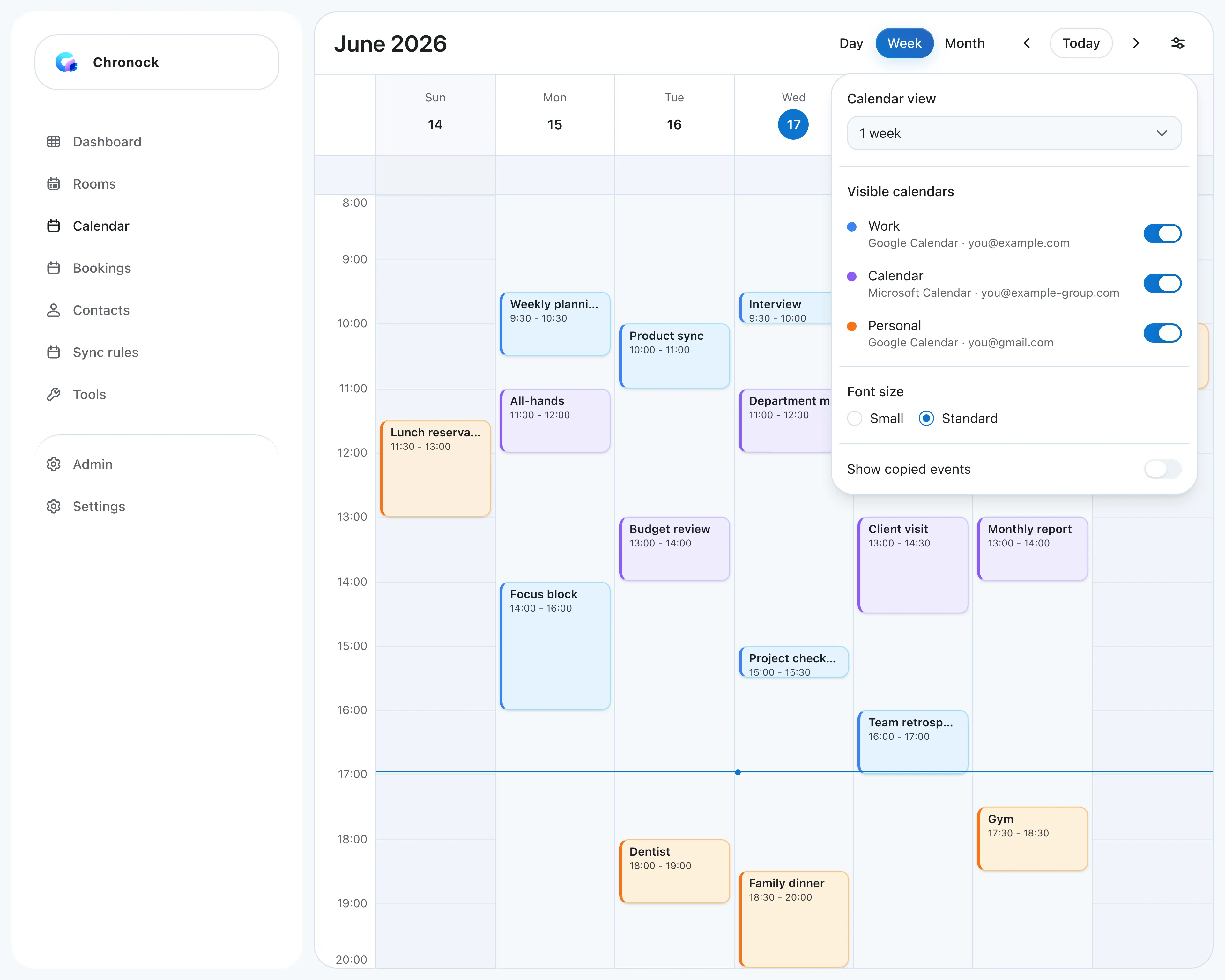 A work Google account, a company Outlook calendar, and a personal Gmail calendar in one week view. Each calendar can be shown or hidden.
See every calendar in one view and edit it
The integrated calendar shows several Google accounts and Microsoft 365 Outlook calendars together, in day, 2-day, 3-day, week, and month views. You can create, edit, and delete events in connected Google and Outlook calendars and choose which calendar an event is saved to. A “Show copied events” switch hides Chronock’s own copies so the same appointment does not appear twice.
Copy personal time to your work calendar as “Busy”
Sync rules copy events one-way or two-way, including across Google and Outlook. A busy-only copy is a real event titled “Busy” in the destination calendar, so coworkers’ free/busy lookups and other booking tools see it. The copy updates or disappears when the original changes. A one-way rule only needs write access to the destination, so a family calendar you can only view can still be the source.
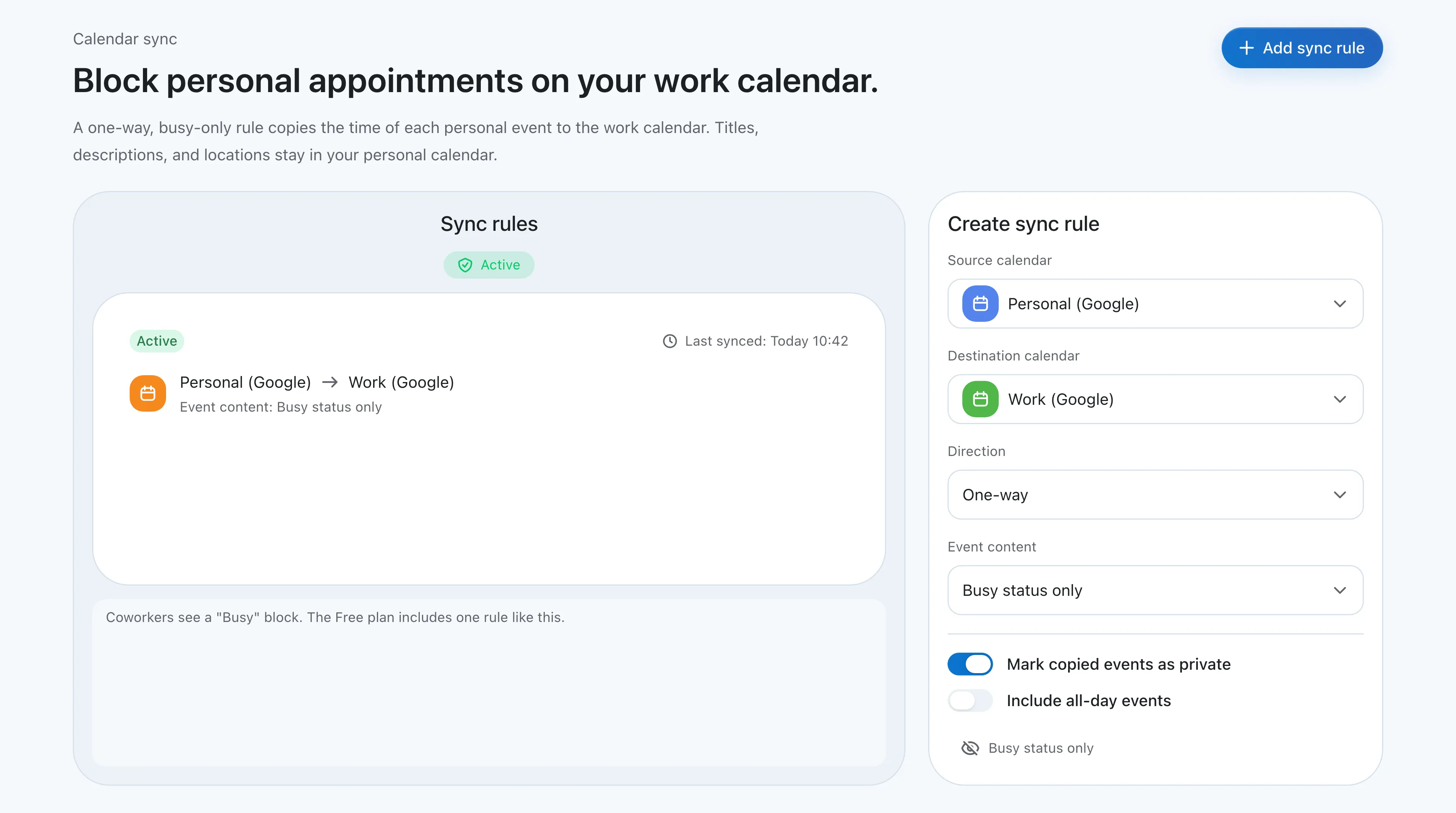 A one-way, busy-only rule from a personal calendar to a work calendar. The Free plan includes one rule like this.
Share booking pages that check every calendar
Booking pages check all connected calendars before showing a time. When a link is not the right fit, Chronock can turn open times into candidate-times text you paste into an email. On Pro, holds protect those times until the other person replies, and bookings and contacts are kept in a simple CRM.
Pricing compared with Reclaim
The free tiers are close. Reclaim Lite includes 1 sync, 1 scheduling link, and 2 connected calendars. Chronock Free includes up to 2 calendar connections across Google and Outlook, booking pages, availability checks across those calendars, and one one-way, busy-only sync rule.
The paid tiers differ more. Chronock Pro is $9/user/month, or $80/year, with unlimited connections and rules, two-way sync, and copying titles and descriptions. Reclaim Starter is $12/seat/month ($10 billed annually) with 3 syncs; unlimited syncs start at Business. Pro has a 7-day free trial.
What Chronock does not do
Be clear about these before you switch:
- No AI task planning. Chronock has no habits, task time-blocking, or focus time goals. If you rely on those, stay with Reclaim or look at Motion.
- No iCloud. Use OneCal, CalendarBridge, SyncThemCalendars, Morgen, or Notion Calendar if iCloud is part of your setup.
- Microsoft 365 work or school accounts only. Personal Microsoft accounts (Outlook.com, Hotmail) are not supported, because Microsoft Graph does not offer free/busy for them. Reclaim and CalendarBridge support Outlook.com.
- Company accounts may need admin approval. Google Workspace and Microsoft 365 admins can restrict third-party apps, so connecting a work account may need your admin to allow Chronock.
- Web app. Chronock runs in the browser.
For a broader look at the idea behind Chronock, see What is a unified calendar?
Choosing by situation
| Situation | Consider |
|---|---|
| You use habits, tasks, and focus time every day | Stay with Reclaim.ai, or try Motion |
| You need iCloud in the sync | OneCal, CalendarBridge, SyncThemCalendars |
| Your personal calendar is on Outlook.com or Hotmail | CalendarBridge, Reclaim.ai |
| Cheapest paid sync with several connections | SyncThemCalendars |
| Sync plus scheduling pages across many providers | CalendarBridge, OneCal |
| A free calendar app with scheduling links and basic blocking | Notion Calendar |
| Google and Microsoft 365 calendars in one view, with editing, busy-only copies, and booking pages | Chronock |
| One free busy-only rule plus a booking page | Chronock (Free), Reclaim.ai (Lite) |
| Unlimited sync rules for less than Reclaim Business | Chronock Pro |
| Candidate times to paste into email, with holds | Chronock Pro |
Bottom line
Reclaim is a strong product when you use its AI planning. Its free plan also covers one sync and one scheduling link, and it supports personal Outlook.com accounts.
If you mainly used Reclaim for sync and scheduling links, a smaller tool may fit better. For pure sync across many providers, including iCloud, look at OneCal, CalendarBridge, or SyncThemCalendars. If your calendars are on Google and Microsoft 365 and you want to see them in one place, copy busy time between them, and share booking pages, Chronock covers that with a free tier and a $9/month Pro plan.
Most tools here offer a free plan or trial. Connect your real calendars to your top two choices and compare.