CalendarBridge vs Chronock (and Other CalendarBridge Alternatives)
CalendarBridge vs Chronock and OneCal: supported calendars, sync limits, scheduling pages, and pricing, plus other CalendarBridge alternatives (2026).
Say your company runs on Microsoft 365, a client gave you a Google Workspace account, and your personal life is in Gmail. Each calendar only knows its own events. A coworker books you over a dentist appointment, or a client books you over an internal meeting.
CalendarBridge and Chronock both solve this. Each copies events between calendars as busy blocks, offers scheduling pages that check more than one calendar, and shows several accounts in one calendar view. They differ in which calendars they support, how they price, and what they add around scheduling. Later sections also compare CalendarBridge with OneCal and list other CalendarBridge alternatives.
This article is published on Chronock’s own blog, so fairness matters. Competitor information below is current as of September 2026, based on each service’s official site and help center. Pricing and features change, so check the latest pages before deciding.
Short answer
Choose CalendarBridge if your calendars go beyond Google and Microsoft 365. It supports personal Outlook.com accounts, iCloud, CalDAV services such as Fastmail, and ICS links, and it has iOS and Android apps. It also publishes HIPAA and SOC 2 information.
Choose Chronock if your calendars are on Google and Microsoft 365 and you want to start for free. Chronock Free includes 2 calendar connections, booking pages, and one one-way, busy-only sync rule. Pro adds unlimited connections and rules for $80/year. Chronock also turns open times into candidate-times text, with holds on Pro, and keeps bookings and contacts in a CRM on Pro.
| Choose | Best fit |
|---|---|
| CalendarBridge | You need iCloud, Outlook.com, CalDAV, or ICS calendars, a mobile app, or HIPAA and SOC 2 documentation. |
| Chronock | Your calendars are on Google and Microsoft 365, and you want a free start, booking pages, candidate times, and a flat price for many calendars. |
Comparison table
| Area | CalendarBridge | Chronock |
|---|---|---|
| Supported calendars | Google (Gmail and Workspace), Microsoft 365 / Exchange Online, Outlook.com (live, hotmail, msn), iCloud, CalDAV (Fastmail, Zoho, Yahoo, AOL, Nextcloud, and others), ICS links. On-premises Exchange is not supported | Google (several accounts), Outlook on Microsoft 365 work or school accounts. No iCloud, no personal Microsoft accounts |
| Sync direction | One-way, two-way, and multi-directional. Each direction is one connection (two-way A⇄B is A→B plus B→A), with its own privacy settings | One-way or two-way sync rules, including across Google and Outlook. Free includes one one-way rule |
| Privacy and sync detail | “Sync all details, just ‘busy,’ or somewhere in between”. Filter by color or category, add a subject identifier, color-code copies | Busy status only, title, or title and description. Option to mark copies private and to include all-day events |
| Sync speed | Real-time for Google and Microsoft. From iCloud and ICS, every 5 to 10 minutes | Copies are created, updated, and deleted as the source event changes |
| Unified calendar | Web, iOS, and Android. Create and edit events, saved back to the source calendar. View limit of 4, 12, or 24 calendars by plan | Web. Day, 2-day, 3-day, week, and month views. Create, edit, and delete Google and Outlook events and pick the calendar to save to |
| Scheduling pages | Up to 10 pages. Checks the booking calendar plus extra calendars you choose. Custom questions, buffers, minimum notice, Zoom / Google Meet / Teams, combined group links, first-available, and round-robin | Booking pages that check every connected calendar. Booking slots grouped into rooms, group scheduling, daily booking limits |
| Proposing times in email | AI Scheduling Assistant that works inside email threads | Candidate-times text to paste into email or chat. Pro adds holds on those times |
| After the booking | Not described on the pages we checked | Bookings and contacts in a CRM (Pro), webhooks |
| Languages | Booking pages in English, Spanish, German, French, Portuguese, and Japanese | Whole app in Japanese, English, French, German, Traditional Chinese, and Korean |
| Free plan | No. 7-day free trial, no credit card | Yes. 2 calendar connections, booking pages, one one-way busy-only rule. 7-day free trial of Pro |
| Pricing | Basic $4/month, Premium $8, Pro $32 billed annually ($5, $10, $40 monthly) | Pro $9/user/month or $80/year |
Where CalendarBridge is strong
CalendarBridge’s biggest advantage is provider coverage.
Its supported calendar types include free Gmail and Google Workspace, Microsoft plans with Exchange Online, and Outlook.com calendars on live.com, hotmail.com, and msn.com addresses. It can sync to iCloud in real time and from iCloud every 5 to 10 minutes. Its CalDAV guide adds Fastmail, Zoho, Yahoo, AOL, Nextcloud, and other standards-compliant servers. Any calendar with a public ICS URL can be a source. The only gaps it lists are on-premises Exchange, legacy Microsoft 365 personal plans without an @outlook.com address, and local Outlook desktop calendars.
Sync control is detailed. Each direction is a separate connection with its own settings, so you can copy full titles one way and busy blocks the other. You can filter which events sync by color or category, and tag copies with a subject identifier.
CalendarBridge also includes more than sync on every plan:
- A unified calendar app. The app page says the unified calendar is included with all plans, on iOS, Android, and the web, and you can edit any event in its original calendar.
- Scheduling pages. Up to 10 per account. Its scheduler docs list buffers, minimum notice, custom questions, Zoom, Google Meet, and Microsoft Teams, plus combined links for group, first-available, and round-robin booking.
- Compliance. The site states HIPAA compliance since 2022, with a BAA available on Premium and Pro, and SOC 2 Type 1 and Type 2 verification in 2026.
- An AI Scheduling Assistant that checks availability and proposes times inside email conversations.
CalendarBridge is the better fit when:
- Your personal calendar is on iCloud or Outlook.com.
- You use Fastmail, Zoho, or another CalDAV calendar.
- You want to see and edit your unified calendar on your phone.
- Your work requires HIPAA or SOC 2 documentation.
What to watch with CalendarBridge
There is no free plan. The pricing page offers a free trial with no credit card, and the help center describes it as a 7-day trial.
Plans are sized by calendar count, and two-way sync uses two connections per pair:
| Plan | Price | Calendars | Sync connections | Unified view |
|---|---|---|---|---|
| Basic | $4/month billed annually, $5 monthly | 2 | 2 | 4 calendars |
| Premium | $8/month billed annually, $10 monthly | 5 | 20 | 12 calendars |
| Pro | $32/month billed annually, $40 monthly | 8 | 56 | 24 calendars |
Basic covers one two-way sync between two calendars. A third calendar moves you to Premium, and a sixth moves you to Pro. Group billing is also available, with per-user licenses and extra sync licenses.
Before choosing CalendarBridge, check how many calendars you will sync over the next year, not only today.
Where Chronock is strong
Chronock is a unified calendar with scheduling and automatic event copying, built around Google Calendar and Outlook on Microsoft 365. It does not replace either one. Your events stay in Google and Outlook, and Chronock reads and writes them there.
A free start for the most common setup
The most common setup is one rule: personal events block the work calendar as “Busy”. Chronock Free covers that at $0, with up to 2 calendar connections across Google and Outlook, booking pages, and availability checks across both calendars. CalendarBridge has no free plan.
A flat price for many calendars
Chronock Pro is $9/user/month, or $80/year, with unlimited calendar connections and sync rules, two-way sync, and copying titles and descriptions. There is no calendar-count tier. For three to five calendars, CalendarBridge Premium is $8/month billed annually ($96/year). For six to eight, Pro is $32/month billed annually ($384/year). Chronock Pro stays at $80/year. For exactly two calendars synced both ways, CalendarBridge Basic ($48/year) costs less.
Busy copies across Google and Outlook
Sync rules copy events one-way or two-way, between Google calendars, between Outlook calendars, or across the two. A busy-only copy is a real event titled “Busy” in the destination calendar, so coworkers’ free/busy lookups and other booking tools see it. A one-way rule only needs write access to the destination, so a shared family calendar you can only view can still be the source.
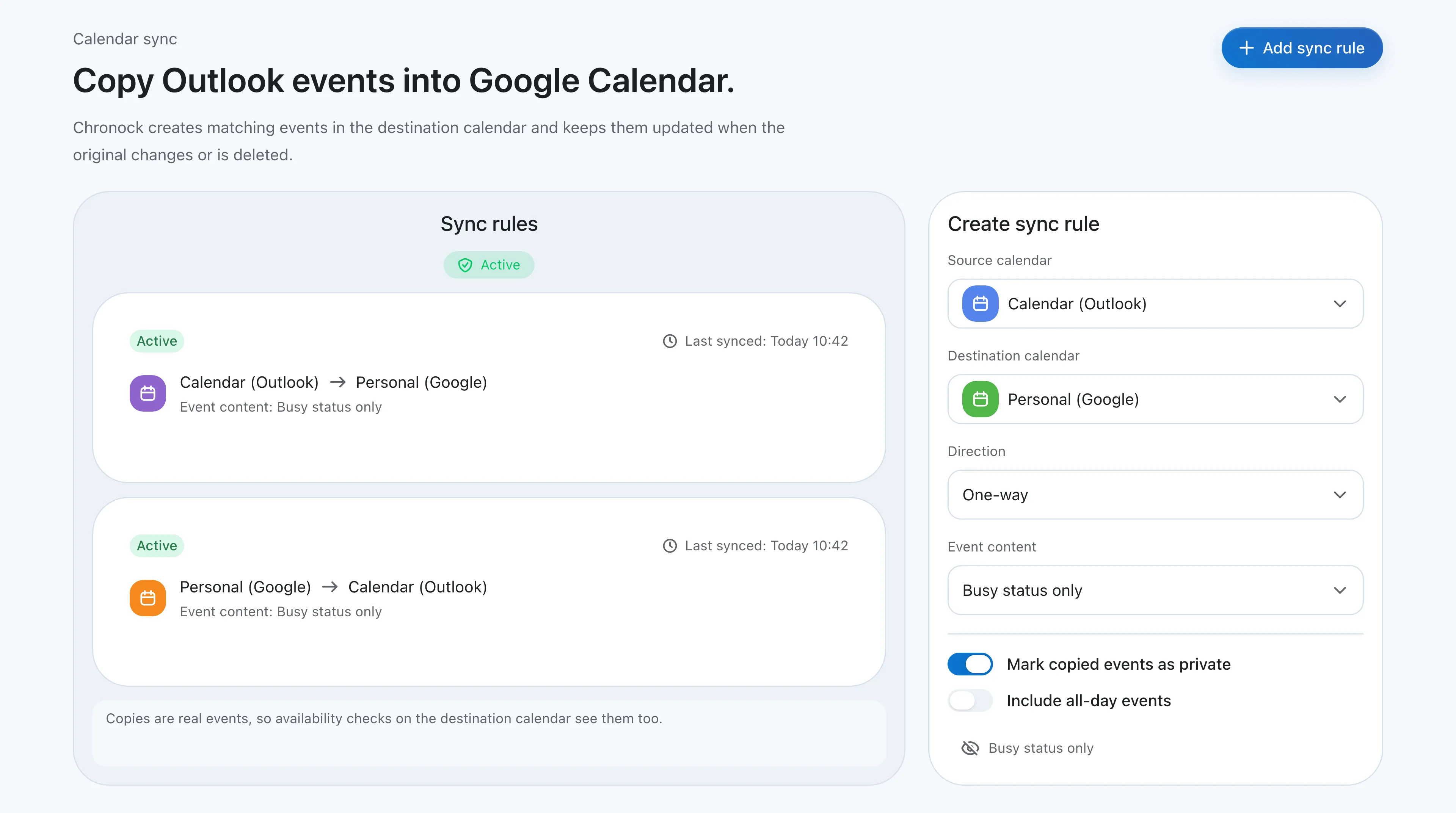 Two one-way, busy-only rules between Outlook and Google. Copies are real events, so availability checks on the destination calendar see them.
For the setup steps and the native options, see How to sync Google Calendar with Outlook.
One view for Google and Outlook, with editing
Both products have a unified calendar. In Chronock, the integrated calendar shows several Google accounts and Microsoft 365 Outlook calendars together, and each calendar can be shown or hidden. You can create, edit, and delete events in connected Google and Outlook calendars. Google recurring events can be edited as “this event”, “this and following”, or “all”. For Outlook events you can change availability status and privacy, and add a Teams meeting on supported Microsoft 365 calendars. A “Show copied events” switch hides Chronock’s own copies so they are not shown twice.
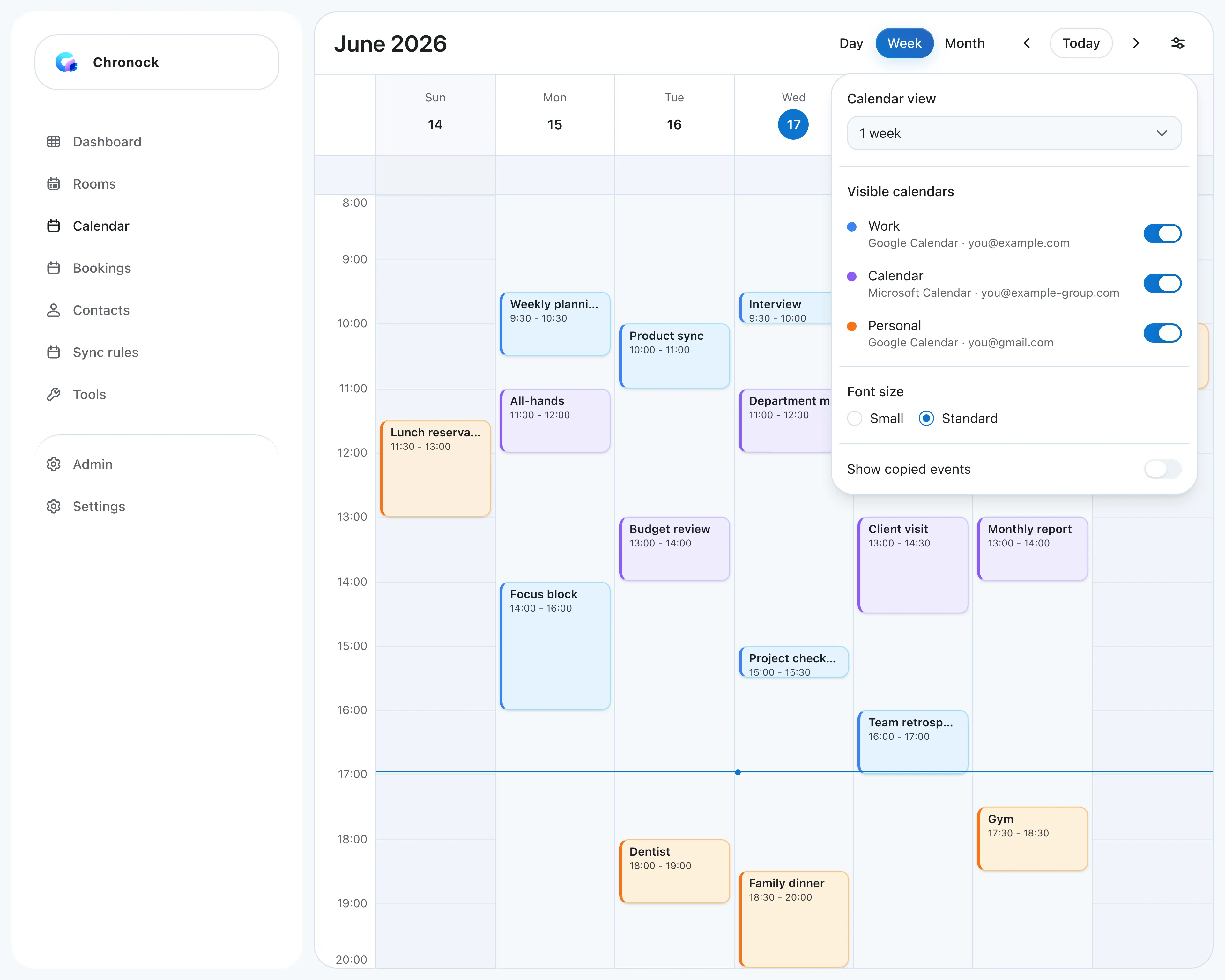 Work Google, company Outlook, and personal Gmail calendars in one week view, with a switch per calendar.
Booking pages, candidate times, and a CRM
Booking pages check every connected calendar before offering a time. Booking slots can be grouped into rooms, with group scheduling and daily booking limits.
When a link feels too formal, Chronock turns open times into candidate-times text you paste into an email. On Pro, holds protect those times until the other person replies, and bookings and contacts are kept in a CRM. Webhooks, plus Zoom and Slack integrations, connect Chronock to the rest of your tools.
A Japanese interface
Chronock’s whole app, including settings and sync rules, is available in six languages, including Japanese. CalendarBridge offers Japanese on its booking pages. We did not confirm a Japanese version of its dashboard.
What to watch with Chronock
- No iCloud. If iCloud is part of your setup, use CalendarBridge.
- Microsoft 365 work or school accounts only. Personal Microsoft accounts (Outlook.com, Hotmail) are not supported, because Microsoft Graph does not offer free/busy for them. CalendarBridge supports Outlook.com.
- No CalDAV or ICS sources. Fastmail, Zoho, and ICS calendars cannot be connected.
- Web app. Chronock runs in the browser. CalendarBridge has iOS and Android apps.
- Admin approval. Google Workspace and Microsoft 365 admins can restrict third-party apps, so connecting a company account may need your admin to allow Chronock.
- Fewer sync filters. Chronock uses content levels (busy, title, title and description). CalendarBridge adds color and category filters and subject identifiers.
Who should choose which
| Situation | Easier choice |
|---|---|
| Your personal calendar is on iCloud | CalendarBridge |
| Your personal calendar is on Outlook.com or Hotmail | CalendarBridge |
| You use Fastmail, Zoho, or another CalDAV calendar | CalendarBridge |
| You need a unified calendar on your phone | CalendarBridge |
| You need HIPAA or SOC 2 documentation | CalendarBridge |
| You want to filter synced events by color or category | CalendarBridge |
| Two calendars, two-way, at the lowest paid price | CalendarBridge Basic |
| One busy-only rule from personal to work, for free | Chronock Free |
| Three or more Google and Microsoft 365 calendars, at one flat price | Chronock Pro |
| Candidate times to paste into email, with holds | Chronock Pro |
| Booking history and contacts next to your scheduling | Chronock Pro |
| A Japanese interface for the whole app | Chronock |
CalendarBridge vs OneCal
OneCal is the other tool most often compared with CalendarBridge. Both combine sync, scheduling pages, and a unified calendar, and neither has a free plan. The figures below come from CalendarBridge’s pricing page and OneCal’s pricing page and sync docs, as of September 2026.
| Area | CalendarBridge | OneCal |
|---|---|---|
| Pricing, billed annually | Basic $4/month, Premium $8, Pro $32 ($5, $10, $40 monthly) | Starter $5/user/month, Essential $10, Premium $25 ($6, $12, $30 monthly) |
| Calendars per plan | 2, 5, or 8 | 2, 5, or 50 |
| Sync limits | 2, 20, or 56 sync connections. Each direction counts as one | Unlimited sync configurations on every plan |
| Providers | Google, Microsoft 365 / Exchange Online, Outlook.com, iCloud, CalDAV, ICS links | Google, Outlook, iCloud |
| Sync speed | Google and Outlook events typically update in under a minute. From iCloud and ICS, every 5 to 10 minutes | Real-time for Google and Outlook. iCloud about every 10 minutes |
| Scheduling pages | Up to 10 | Unlimited scheduling links |
| Unified calendar app | Web, iOS, and Android. View 4, 12, or 24 calendars at once by plan | Unified calendar view on every plan, with iOS, Android, and macOS apps |
| Trial | Free trial, no credit card (7 days per the help center) | 14-day trial, no credit card |
CalendarBridge fits if you use Outlook.com, CalDAV, or ICS calendars, or need a HIPAA BAA. It also costs less at 2 or 5 calendars: $48/year for Basic versus $60/year for OneCal Starter, and $96/year for Premium versus $120/year for Essential. OneCal fits if you sync more than 8 calendars, need more than 10 booking links, or want a macOS app. Premium covers 50 calendars for $300/year, while CalendarBridge Pro covers 8 for $384/year.
For a closer look at OneCal, see OneCal vs Chronock.
Other CalendarBridge alternatives
If CalendarBridge is not the right fit, these are the other tools worth checking. All facts are as of September 2026.
OneCal
OneCal syncs Google, Outlook, and iCloud calendars one-way or multi-way, with unlimited scheduling links and a unified calendar on every plan. There is no free plan; plans start at $60/user/year for 2 calendars after a 14-day trial. Full comparison: OneCal vs Chronock.
SyncThemCalendars
SyncThemCalendars does sync only. It connects Google, Outlook, and iCloud, one-way or two-way, and can hide any field behind a “Busy” block. Plans start at $3.99/month billed yearly ($47.88) for 5 syncs, after a 14-day trial. Full comparison: SyncThemCalendars vs Chronock.
Reclaim.ai
Reclaim.ai is an AI planner with calendar sync and scheduling links. Its free Lite plan includes 1 sync, 1 scheduling link, and 2 connected calendars, and it supports Google and Outlook, including Outlook.com. iCloud works only after you import it into Google or Outlook. More options: Reclaim.ai alternatives.
Morgen
Morgen is a calendar app for Google, Outlook, iCloud, and CalDAV calendars, with an AI planner and booking links. Its calendar propagation workflow blocks time as “Private Event (from Morgen)”, but it runs daily at 6:00 pm for the next 14 days, or when you trigger it, so changes are not copied right away. The pricing page lists $15/month billed yearly.
Chronock
Chronock, compared in detail above, has a free plan for Google and Microsoft 365 calendars. It includes 2 calendar connections, booking pages, and one one-way, busy-only rule. Pro is $80/year for unlimited connections and rules. It does not support iCloud, Outlook.com, or CalDAV.
Bottom line
CalendarBridge is the broader tool. It connects nearly every calendar you might have, including iCloud, Outlook.com, and CalDAV, and gives you sync, scheduling pages, and a unified calendar on the web and on your phone. If provider coverage or compliance is the deciding factor, pick CalendarBridge.
Chronock is the simpler choice when your calendars are on Google and Microsoft 365. It starts free, keeps one flat price as you add calendars, and adds candidate times, holds, and a CRM next to booking pages and sync rules.
If you need more than 8 calendars or more than 10 booking links, compare OneCal as well.