Compare Calendly scheduling links and Chronock
A fair comparison of Calendly and Chronock across scheduling links, calendars, team features, localization, pricing, candidate times, and calendar sync.
Calendly is one of the best-known scheduling-link products. You create a booking page, share a link, and let guests choose a time. It is polished, widely recognized, and strong enough for individuals, sales teams, recruiting teams, and large organizations.
Chronock also creates scheduling links from Google Calendar and Microsoft Outlook (Microsoft 365) availability. The difference is focus: Chronock is not trying to replace every Calendly workflow. It is built for Google Calendar users who want booking links, candidate-time text, cross-calendar event sync, and booking follow-up in a lighter tool, with an integrated calendar that shows connected Google and Outlook calendars in one view.
This article is published by Chronock, so the comparison needs to be careful. It uses Calendly’s official pricing page and Calendly Help articles as of July 2026, and Chronock’s published features as of September 2026, with Mac app availability checked in October 2026. Features and prices change, so check each product’s latest pages before making a purchasing decision.
Short answer
Choose Calendly if you need a mature scheduling platform with broad calendar coverage including iCloud and Exchange, Salesforce, HubSpot, Marketo, Pardot, round robin, lead routing, payments, mobile apps, browser extensions, and enterprise administration. Calendly is especially strong for global sales and recruiting teams.
Choose Chronock if your scheduling runs mostly on Google Calendar and you want a lower-cost tool for booking links, candidate times, calendar-to-calendar sync, booking history, and contact management, with one calendar view across your connected calendars.
| Choose | Best fit |
|---|---|
| Calendly | You need iCloud, Exchange, or personal Microsoft accounts, round robin, lead routing, CRM and marketing automation integrations, payment collection, mobile apps, browser extensions, or enterprise controls. |
| Chronock | You mainly use Google Calendar or Outlook (Microsoft 365) and want booking links, candidate-time text, cross-calendar sync, and booking follow-up at a lower price. |
Comparison table
| Area | Calendly | Chronock |
|---|---|---|
| Supported calendars | Google Calendar, Office 365 / Outlook.com, Exchange | Google / Outlook (Microsoft 365) Free: up to 2 connected calendars across Google and Outlook; Pro: unlimited. |
| Free plan | 1 event type, 1 connected calendar, booking page customization, video conferencing, mobile apps, browser extensions | 1 team member, 1 booking slot, shareable booking page, up to 2 connected calendars across Google and Outlook, availability detection, Zoom and Slack integrations |
| Paid calendar connections | Up to 6 calendars per user | Pro supports unlimited calendar connections. |
| Meeting types | One-on-one, group, collective, and round robin | Booking slots and group scheduling. More flexible routing such as round robin is planned |
| Team and sales workflows | Salesforce, round robin, lead routing, HubSpot, Marketo, Pardot, and advanced admin features on higher plans | Up to 50 team members, permissions, CRM, booking history, and contact management on Pro |
| Payments | Stripe and PayPal on Standard and above | Focused on scheduling, candidate times, calendar sync, and booking follow-up |
| Calendar-to-calendar sync | Calendly creates meetings on one primary calendar. Ongoing event copy between calendars is not its core purpose | One one-way, busy-only sync rule on Free. Pro adds multiple rules, two-way sync, and title/description sync |
| Candidate-time text | Strong around booking links, meeting polls, and one-off meetings | Candidate dates tool creates text you can paste into email or chat |
| Calendar view | The Calendar page lists scheduled meetings by date. It is not a day/week/month view of everything on your connected calendars | Integrated calendar shows connected Google and Outlook (Microsoft 365) calendars in day, week, and month views, and lets you create and edit events there |
| Apps | iOS and Android apps | Web app and Mac app (Apple Silicon, macOS 14+). Native iOS and Android apps are in preparation |
| Localization | Account UI languages are English, French, Spanish, German, and Portuguese (Brazil). Invitee pages and notifications support seven native languages, not including Japanese or Traditional Chinese | Product and site UI are available in Japanese, English, French, German, Traditional Chinese, and Korean |
| Pricing | Free, Standard $10/seat/month, Teams $16/seat/month, Enterprise from $15,000/year. These are Calendly’s annual-billing prices | Free $0. Pro $9/user/month or $80/user/year, equivalent to $6.67/user/month |
Where Calendly is strong
Calendly’s main strength is the breadth around scheduling links.
Calendly’s official Pricing page says the Free plan includes one event type, one connected calendar, availability customization, video conferencing, booking page customization, mobile apps, and browser extensions. If you only need one simple booking link, Calendly is easy to start with.
Calendly Help’s Connect your calendar to Calendly article says Calendly supports Google Calendar, Office 365 or Outlook.com, and Exchange. It also says Free can connect one calendar and paid plans can connect up to six calendars per user. Chronock also supports Google Calendar and Outlook (Microsoft 365), so Calendly’s remaining advantage is when iCloud, on-premises Exchange, or personal Microsoft accounts are required.
Calendly Help’s Event types article describes four event types: one-on-one, group, collective, and round robin. Those are valuable when a team needs to rotate owners, combine host availability, or accept group bookings.
Calendly is especially useful when:
- You schedule from iCloud, Exchange, or personal Microsoft accounts as well as Google Calendar.
- Sales or recruiting teams need round robin distribution.
- You want Salesforce, HubSpot, Marketo, Pardot, Mailchimp, Zapier, or webhook workflows.
- You collect payments through Stripe or PayPal during booking.
- You share links from mobile apps or browser extensions.
- You need SAML SSO, SCIM, audit logs, domain control, or dedicated account support.
Calendly’s Pricing page lists Salesforce meeting sync, round robin, lead routing, HubSpot/Marketo/Pardot connections, and advanced admin features on Teams, with Salesforce lookup routing, Microsoft Dynamics, dedicated support, SSO/SAML, domain control, audit-log compliance, and data-deletion APIs on Enterprise.
That is not the same category Chronock is trying to replace feature by feature. If your organization wants a global sales or recruiting scheduling platform, Calendly is a strong candidate.
Limits to watch in Calendly
Calendly Free is useful, but it is intentionally limited. The official Pricing page lists one event type and one connected calendar on Free. Unlimited event types, multiple calendars, HubSpot/Mailchimp, Stripe/PayPal, Zapier/webhooks, automated reminders, scheduling outreach, and 24/7 chat support are in paid tiers.
Calendar behavior also matters. Calendly Help says Calendly checks connected calendars for busy times and adds new meetings to a calendar. However, it also says Calendly events are added to one calendar only; when multiple calendars are connected, you choose a primary calendar where scheduled events are created. If your need is to continuously copy busy blocks between work, personal, or side-business calendars, Calendly is not primarily a cross-calendar sync tool.
Localization can also be a deciding factor. Calendly Help’s Account settings overview lists account display languages as English, French, Spanish, German, and Portuguese (Brazil). Its event type language article lists native invitee-page and notification translations for French, Spanish, German, Dutch, Portuguese (Brazil), Italian, and Ukrainian. Japanese and Traditional Chinese are not listed there.
Browser translation may help, but Calendly notes that browser-translated booking pages are not native translations and their accuracy is not guaranteed. Calendly also says custom text such as event type names, descriptions, and custom questions must be translated manually.
For teams operating in languages outside Calendly’s native language list, the product can still work, but translation and wording checks become part of the workflow.
Pricing comparison
Calendly’s official Pricing page lists annual-billing prices: Free at $0, Standard at $10/seat/month, Teams at $16/seat/month, and Enterprise from $15,000/year. Calendly Help’s team plan article also explains that Teams annual pricing steps down at larger seat counts.
Chronock’s Pricing page lists Free at $0 and Pro at $9/user/month or $80/user/year. Annual Pro is equivalent to $6.67/user/month.
| Service and plan | Price |
|---|---|
| Calendly Free | $0 |
| Calendly Standard | $10/seat/month, billed annually |
| Calendly Teams | $16/seat/month, billed annually for 1-30 seats |
| Calendly Enterprise | From $15,000/year |
| Chronock Free | $0 — up to 2 connected calendars across Google and Outlook |
| Chronock Pro monthly | $9/user/month — unlimited calendar connections |
| Chronock Pro annual | $80/user/year, equivalent to $6.67/user/month — unlimited calendar connections |
Chronock Pro annual is below Calendly Standard annual on a per-seat basis: $80/year versus $120/year. That does not mean the plans are equivalent. Calendly Standard includes features such as multiple calendars, payment connections, automation, and broader integrations; Calendly Teams adds round robin and routing workflows.
If you need those Calendly workflows, the higher price can make sense. If your main needs are Google Calendar availability, booking links, candidate-time text, cross-calendar sync, and lightweight CRM, Chronock is easier to justify on price.
What Chronock adds
Chronock is designed for Google Calendar users who want scheduling links and practical calendar operations in one place.
Free includes one team member, one active booking slot, a shareable booking page, up to 2 connected calendars across Google and Outlook, and availability detection. Pro adds unlimited booking slots, group scheduling, cross-calendar event sync, provisional calendar holds, CRM, booking history, contact management, team management, and priority support. Pro supports unlimited calendar connections.
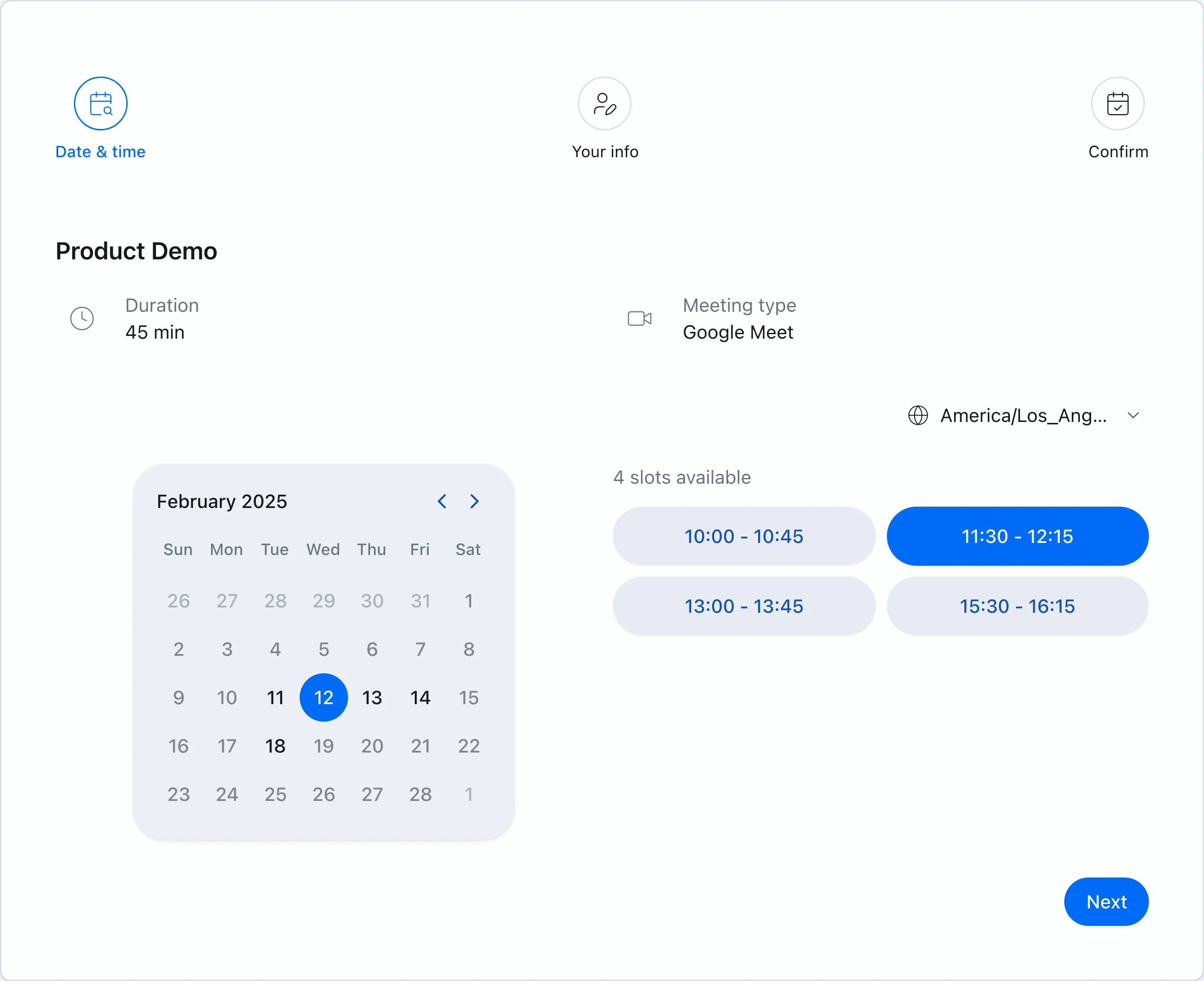 Chronock booking pages show only times available from your connected Google Calendars.
Multiple Google Calendars from Free
Calendly Free connects one calendar. If you want multiple connected calendars, you need a paid Calendly plan.
Chronock Free connects up to two calendars across Google and Outlook, so work and personal events can both affect booking availability. Three or more calendar connections require Pro.
Booking links and candidate-time text
Calendly is excellent for booking links, meeting polls, and one-off meetings. But in some relationships, sending “Would any of these three times work?” inside an email is more natural than sending a link immediately.
Chronock’s candidate dates tool creates candidate times from connected Google Calendars and turns them into text you can paste into email or chat. Pro also supports provisional holds, reducing the chance that a proposed time is taken while you wait for a reply.
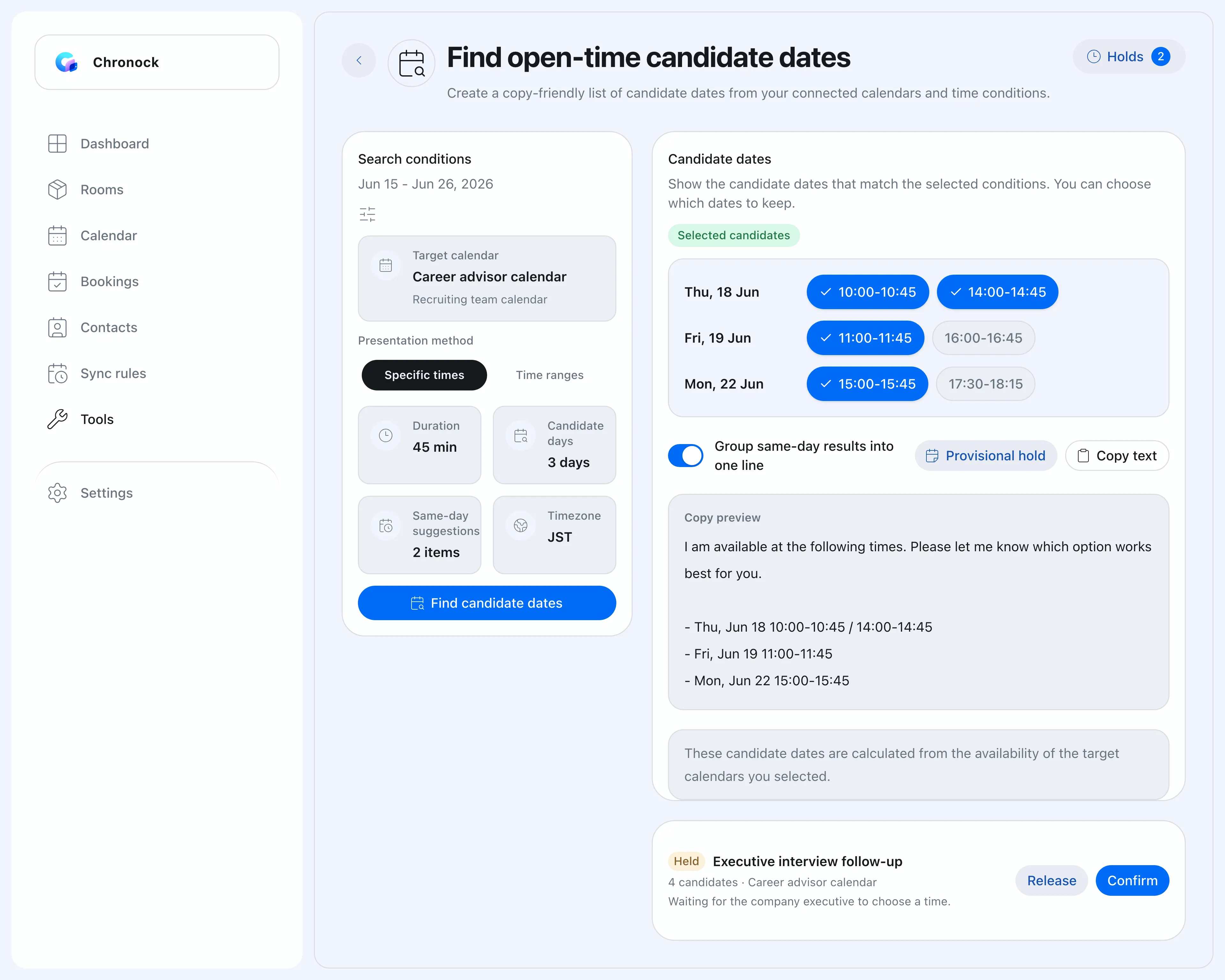 Candidate-time text gives you another option when a booking link feels too direct.
Cross-calendar sync in the same tool
Calendly is strong at scheduling meetings. It is not mainly a tool for copying busy blocks between calendars.
Chronock lets you create event-sync rules between calendars — Google to Google, Outlook to Outlook, and across providers between Google and Outlook. The Free plan includes one one-way, busy-only rule; Pro adds multiple rules, two-way sync, and the option to show titles or descriptions at the destination. That is useful when you want to avoid double booking without exposing personal or client details.
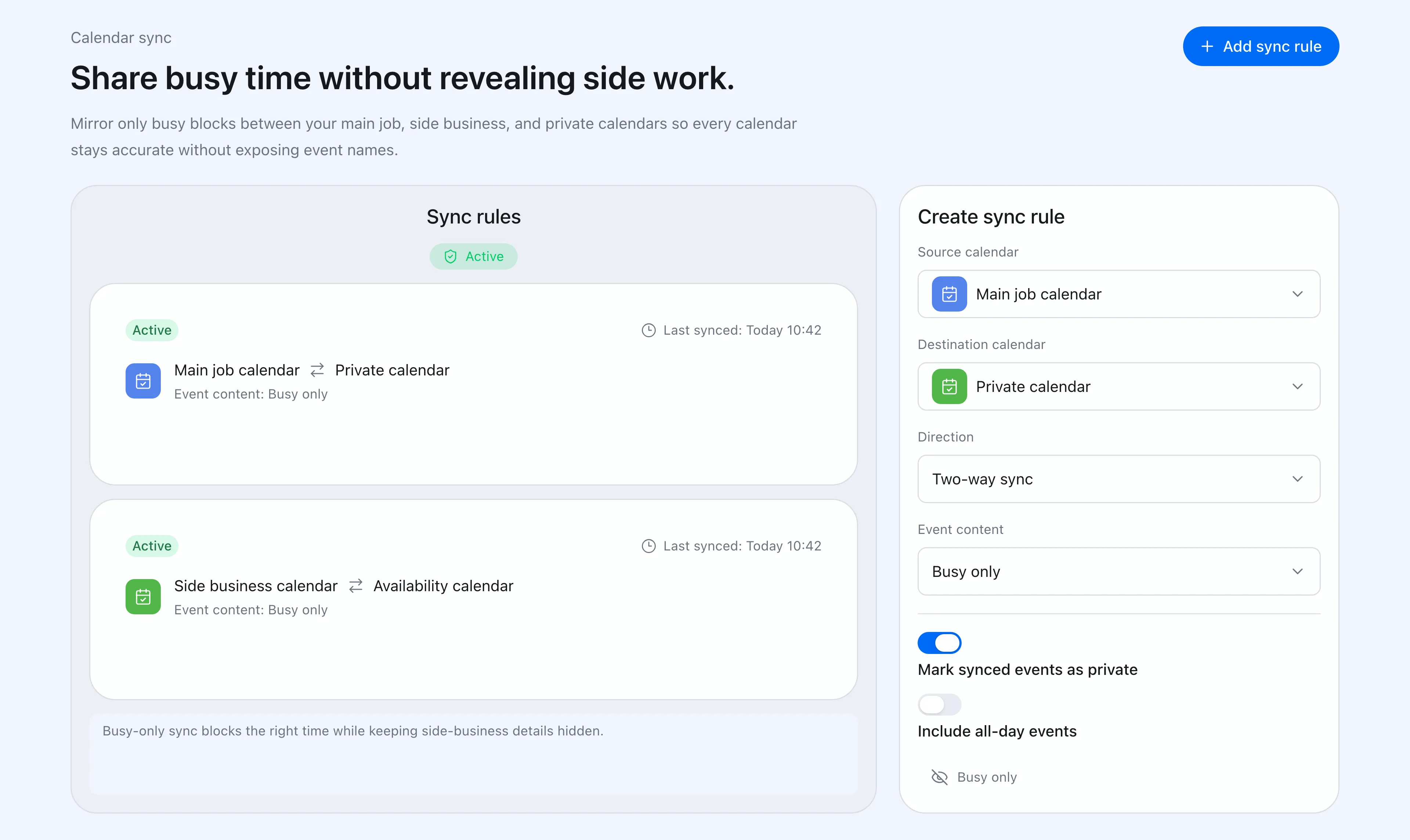 Chronock sync rules control direction and how much event information is shown on the destination calendar.
One calendar view across Google and Outlook
Calendly shows the meetings it scheduled. Everything else on your calendars stays in Google Calendar or Outlook, so checking your week still means switching apps.
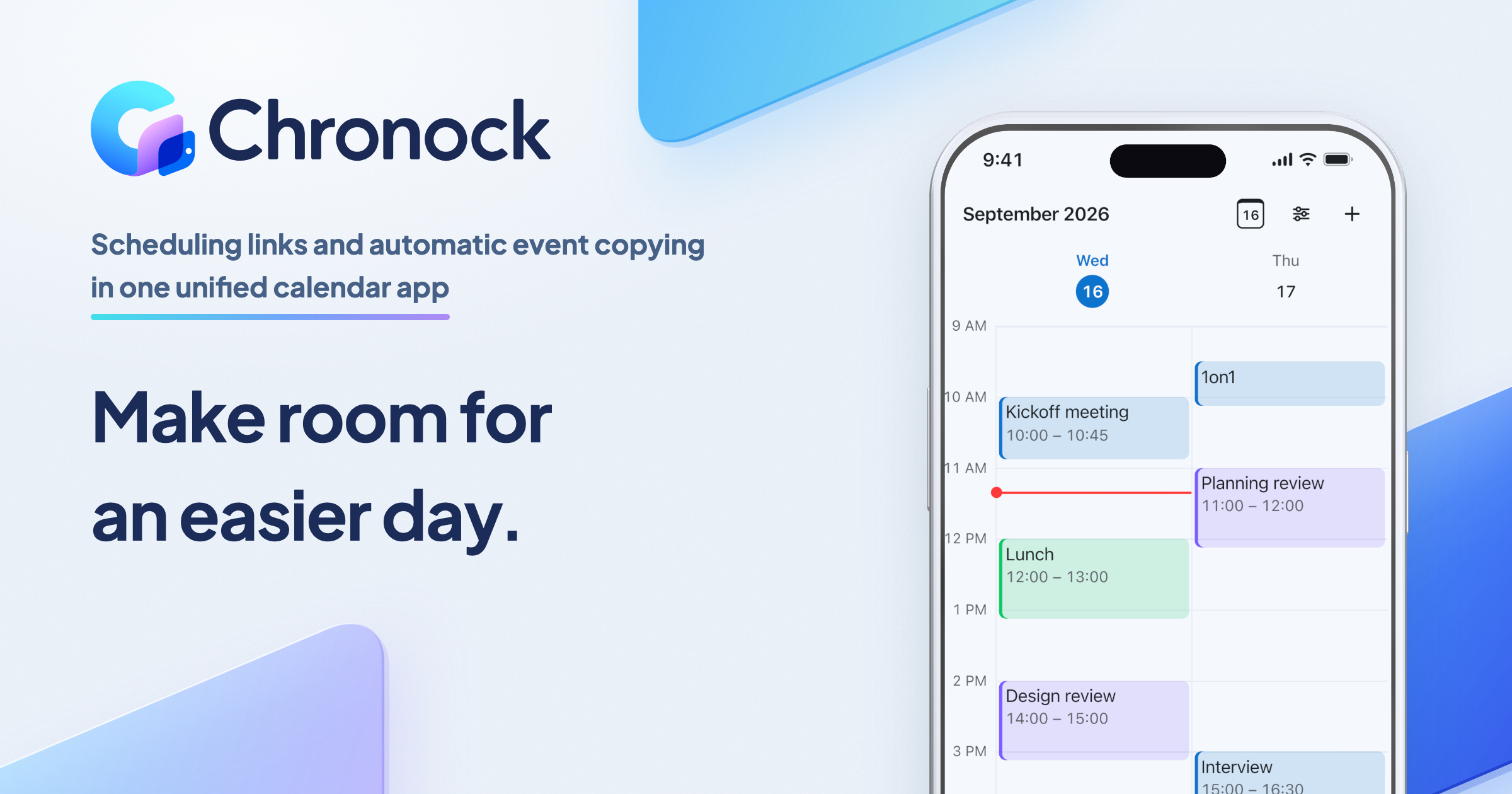
Chronock’s integrated calendar shows every connected Google and Outlook (Microsoft 365) calendar in one day, week, or month view, with per-calendar colors and visibility. You can create and edit events on those calendars from the same screen, and the view updates as changes arrive from the providers. Booking pages, candidate times, and sync rules read from the same set of calendars, so what you see is what guests can book.
Booking follow-up without a heavy sales stack
Sales, recruiting, customer success, and consulting workflows often need contact context after a booking is made.
Chronock Pro includes CRM-style booking history, contacts, and notes. It is not a replacement for Salesforce, but it helps small teams manage follow-up without adopting a heavy sales platform just to run scheduling.
Limits to watch in Chronock
Chronock does not match Calendly’s breadth of calendar providers or sales integrations. Chronock supports Google Calendar and Microsoft Outlook calendars (Microsoft 365 work or school accounts), and its public FAQ says the same; iCloud Calendar is not supported. Chronock’s Outlook integration works with Microsoft 365 work or school accounts. Personal Microsoft accounts (such as Outlook.com) are not supported due to Microsoft API limitations. If iCloud, on-premises Exchange, Microsoft Dynamics, Salesforce lookup routing, or a full enterprise scheduling stack is required, Calendly is more realistic.
Calendly’s round robin and lead routing are also important. Chronock Pro supports group scheduling, but more flexible routing such as round robin or choosing a specific organizer is planned rather than the current core feature set. If owner distribution is central to your sales or recruiting process, compare against Calendly Teams or Enterprise.
Before choosing Chronock, check whether:
- Google Calendar and Outlook (Microsoft 365) are enough for the calendars you need to consider.
- iCloud, on-premises Exchange, or personal Microsoft accounts must be part of availability.
- Round robin, lead routing, Salesforce, HubSpot, Marketo, or Pardot are required.
- Stripe or PayPal payment collection during booking is required.
- Mobile apps or browser extensions are required today. Chronock’s native mobile apps are in preparation, but not yet available.
- Candidate-time text, cross-calendar sync, and booking follow-up matter more than a broad sales stack.
Which should you choose?
Calendly is feature-rich and mature. The better question is whether your bottleneck is advanced routing and integrations, or Google Calendar-centered scheduling operations.
| Situation | Easier choice |
|---|---|
| You use iCloud, on-premises Exchange, or personal Microsoft accounts | Calendly |
| You need round robin owner distribution | Calendly |
| You need deep Salesforce, HubSpot, Marketo, or Pardot workflows | Calendly |
| You collect payments with Stripe or PayPal during booking | Calendly |
| You need SSO, SCIM, audit logs, domain control, or dedicated support | Calendly Enterprise |
| Your calendars are mainly Google Calendar or Outlook (Microsoft 365) | Chronock |
| You want multiple Google Calendar availability checks from Free | Chronock |
| You want candidate times you can paste into email or chat | Chronock |
| You need busy-only sync between Google Calendars | Chronock (one rule on Free, more on Pro) |
| You want Google and Outlook calendars in one view, next to your booking pages and sync rules | Chronock |
| You want a lower per-seat price for scheduling, sync, and follow-up | Chronock |
Summary
Calendly is a global scheduling standard for good reasons. Its event types, broad calendar coverage including iCloud and Exchange, round robin, routing, CRM and marketing integrations, payments, mobile apps, and enterprise controls make it a strong product.
Chronock is a lighter tool for Google Calendar and Outlook (Microsoft 365) users that puts an integrated calendar, scheduling links, and calendar sync in one place. It is built for booking links, candidate-time text, cross-calendar sync, booking history, and contact management at a lower price.
Choose Calendly when you need iCloud, Exchange, or advanced sales routing. Choose Chronock when your workflow is centered on Google Calendar or Outlook (Microsoft 365) and you care more about candidate times, calendar sync, follow-up, and cost.