SyncThemCalendars vs Chronock: Calendar Sync Compared
A fair comparison of SyncThemCalendars and Chronock across supported calendars, sync options, privacy controls, booking pages, and pricing, as of July 2026.
本文目前僅提供英文版。
If you keep work, personal, and side-project schedules in separate calendars, sooner or later two of them collide. Calendar sync tools solve this by copying events between calendars — often as private busy blocks — so every calendar knows when you are actually free.
SyncThemCalendars is a focused tool that does exactly this across Google Calendar, Microsoft Outlook, and Apple Calendar. Chronock approaches the same double-booking problem from the scheduling side: booking pages, availability across multiple calendars, candidate-time text, and calendar-to-calendar sync — across Google Calendar and Microsoft Outlook calendars (Microsoft 365 work or school accounts), including cross-provider Google-to-Outlook connections — in one product.
This article is published on Chronock’s own blog, so fairness matters. The information below is current as of July 10, 2026. It is based on SyncThemCalendars’ official site and pricing page plus Chronock’s published features. Pricing and features may have changed since, so always check each service’s latest pages before deciding.
Short answer
Choose SyncThemCalendars if calendar sync is the entire job — especially if your setup includes iCloud calendars or Outlook on a personal Microsoft account. It syncs any combination of Google, Outlook, and iCloud calendars, one-way or two-way, with field-level privacy masking, at a low price starting at $3.99/month billed annually ($4.99 with monthly billing).
Choose Chronock if your calendars are on Google or Microsoft 365 and sync is part of a bigger scheduling workflow: you also want booking pages, availability detection across calendars, candidate times for email, and booking history in the same tool. Chronock covers Google-to-Google, Outlook-to-Outlook, and cross-provider Google-to-Outlook sync.
| Choose | Best fit |
|---|---|
| SyncThemCalendars | You need pure calendar sync at minimal cost, especially involving iCloud or personal Microsoft accounts. |
| Chronock | You mainly use Google Calendar or Outlook (Microsoft 365) and want sync plus booking pages, candidate times, and post-booking management. |
Comparison table
| Area | SyncThemCalendars | Chronock |
|---|---|---|
| Supported calendars | Google Calendar, Microsoft Outlook / Office 365, Apple Calendar (iCloud), in any combination | Google / Outlook (Microsoft 365) |
| Sync direction | One-way and two-way sync per connection | One-way and two-way sync rules across Google and Outlook calendars, including cross-provider Google-to-Outlook |
| Privacy and sync detail | Field-level control — copy titles, descriptions, and locations, or mask any of them as busy blocks | Practical visibility levels such as busy-only, title-only, or title and description |
| Sync speed | Described as real-time on the official site | Calendar changes are reflected in availability detection in real time. Pro sync is designed to stay up to date |
| Booking pages / scheduling links | Not offered — sync only | Booking pages on Free, unlimited booking slots on Pro |
| Candidate-time text | Not offered | Candidate dates tool with copy-friendly text. Pro adds provisional holds |
| Post-booking management | Not applicable | Booking history, contacts, and CRM on Pro |
| Free plan | No free plan; 14-day trial without a credit card | Free plan available, including one one-way, busy-only sync rule. Multiple rules, two-way sync, and title/description sync are Pro |
| Languages | English, French, German, Japanese, Spanish | Japanese, English, and Traditional Chinese UI |
| Pricing | Basic $3.99/month (5 syncs), Premium $7.99/month (16 syncs), Professional $17.99/month (36 syncs), billed annually; monthly billing is $4.99, $9.99, and $19.99 | Free $0. Pro is $9/user/month or $80/user/year ($6.67 effective monthly) |
Where SyncThemCalendars is strong
SyncThemCalendars does one thing and does it well.
The official site describes syncing any combination of Google, Outlook, and iCloud calendars — cross-provider included — with each “sync” being one connection between two calendars. You choose one-way copying or two-way mirroring per connection, and control what the copies reveal at field level: keep titles and locations, or mask everything as private busy blocks.
Pricing is among the lowest in the category. As of July 2026 the pricing page lists annual-billing rates of $3.99/month for Basic with 5 sync connections, $7.99 for Premium with 16, and $17.99 for Professional with 36. The corresponding monthly-billing rates are $4.99, $9.99, and $19.99. All plans include unlimited events and calendars for a single user, and there is a 14-day trial with no credit card. The service has operated since 2019, supports five interface languages including Japanese, and states plainly that calendar data is used only to copy events between calendars.
SyncThemCalendars is especially compelling when:
- Your calendars include iCloud, or Outlook calendars on personal Microsoft accounts.
- You want the cheapest reliable way to keep two or a few calendars mirrored.
- You need field-level control over what synced copies reveal.
- You already have a scheduling tool you like and only need sync.
What to watch with SyncThemCalendars
The scope is deliberately narrow, and that cuts both ways.
There are no booking pages or scheduling links — if you also need to let clients book time, you will run a second tool alongside it. There is no candidate-time generation, no booking history, and no team features; plans are per single user. There is also no free tier: after the 14-day trial, ongoing use is paid.
Before adopting SyncThemCalendars, check:
- Whether sync alone solves your problem, or scheduling is part of it.
- How many sync connections you actually need (this decides your tier).
- Whether single-user plans fit your team situation.
None of this is a flaw. It is the profile of a specialized tool that keeps its price low by staying small.
Pricing comparison
| Service / plan | Price |
|---|---|
| SyncThemCalendars Basic | $3.99/month billed annually, or $4.99 monthly (5 sync connections) |
| SyncThemCalendars Premium | $7.99/month billed annually, or $9.99 monthly (16 sync connections) |
| SyncThemCalendars Professional | $17.99/month billed annually, or $19.99 monthly (36 sync connections) |
| Chronock Free | $0 (includes one one-way, busy-only sync rule) |
| Chronock Pro | $9/user/month, or $80/user/year ($6.67 effective monthly) |
If a single one-way, busy-only rule between two calendars covers your case, Chronock’s Free plan handles it at $0 — SyncThemCalendars has no free tier. For multiple sync connections, SyncThemCalendars Basic is cheaper than Chronock Pro. Chronock’s paid case is consolidation: Pro’s $80/year covers multiple sync rules plus booking pages, unlimited booking slots, candidate times with provisional holds, CRM, and booking history. If you would otherwise pay for a sync tool and a scheduling tool separately, one Chronock subscription can replace both — provided your calendars are on Google or Microsoft 365.
Where Chronock is strong
Chronock treats sync as one part of a scheduling workflow rather than the whole product. Google Calendar remains its primary, most mature provider, and Microsoft Outlook calendars (Microsoft 365 work or school accounts) are now supported as well.
The Free plan includes booking-page creation, multiple calendar connections across Google and Outlook, automatic availability detection — and one one-way, busy-only sync rule, so the most common setup (blocking your work calendar with personal busy time) runs at $0.
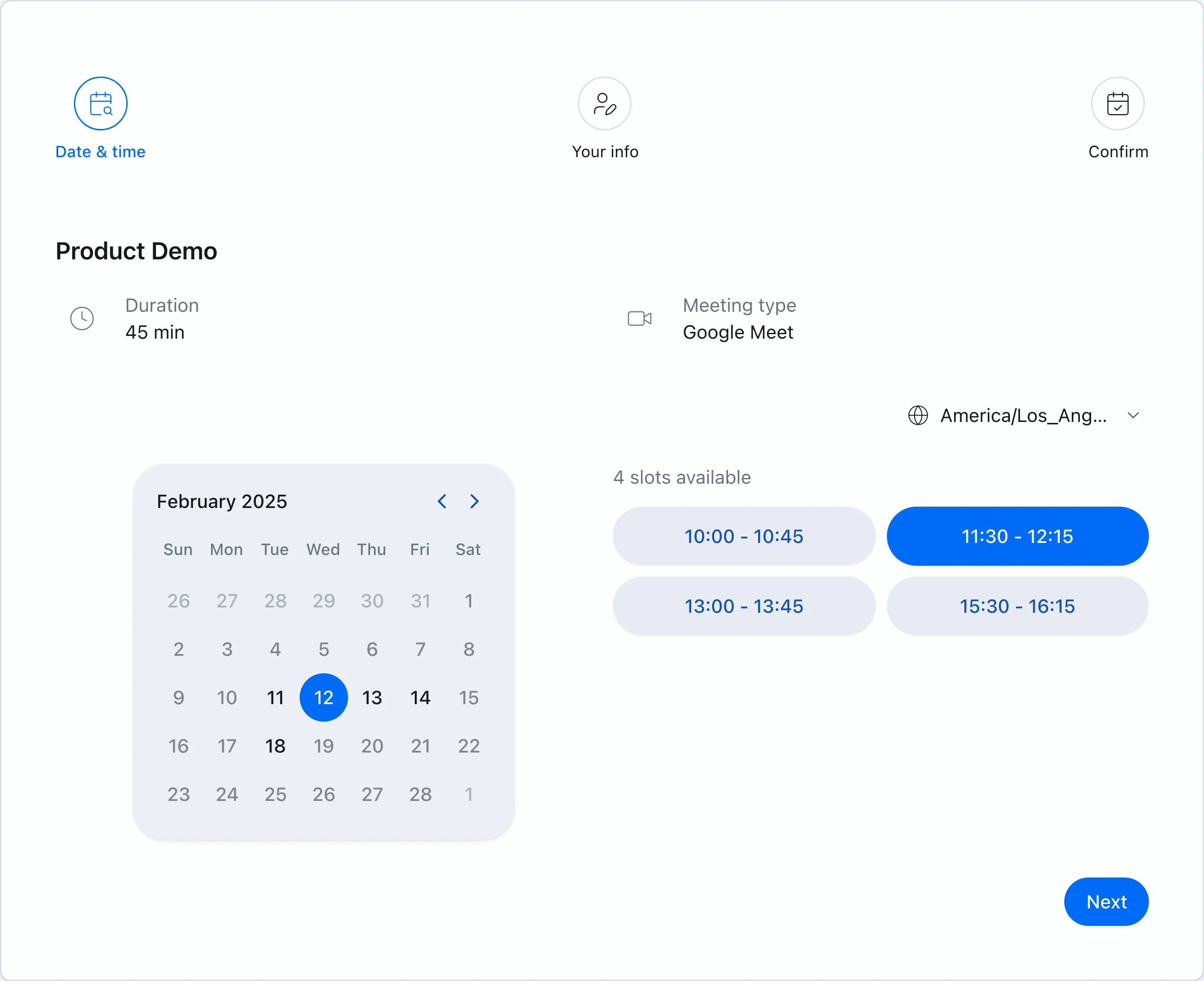 Chronock booking pages show only genuinely available times based on your connected calendars.
Sync and scheduling reinforce each other
Chronock Pro’s sync rules copy events between calendars — Google-to-Google, Outlook-to-Outlook, and cross-provider Google-to-Outlook — with visibility levels such as busy-only, title-only, or title and description. Because the same product runs your booking pages, a personal event that syncs into your work calendar immediately blocks new bookings too — no coordination between two separate tools.
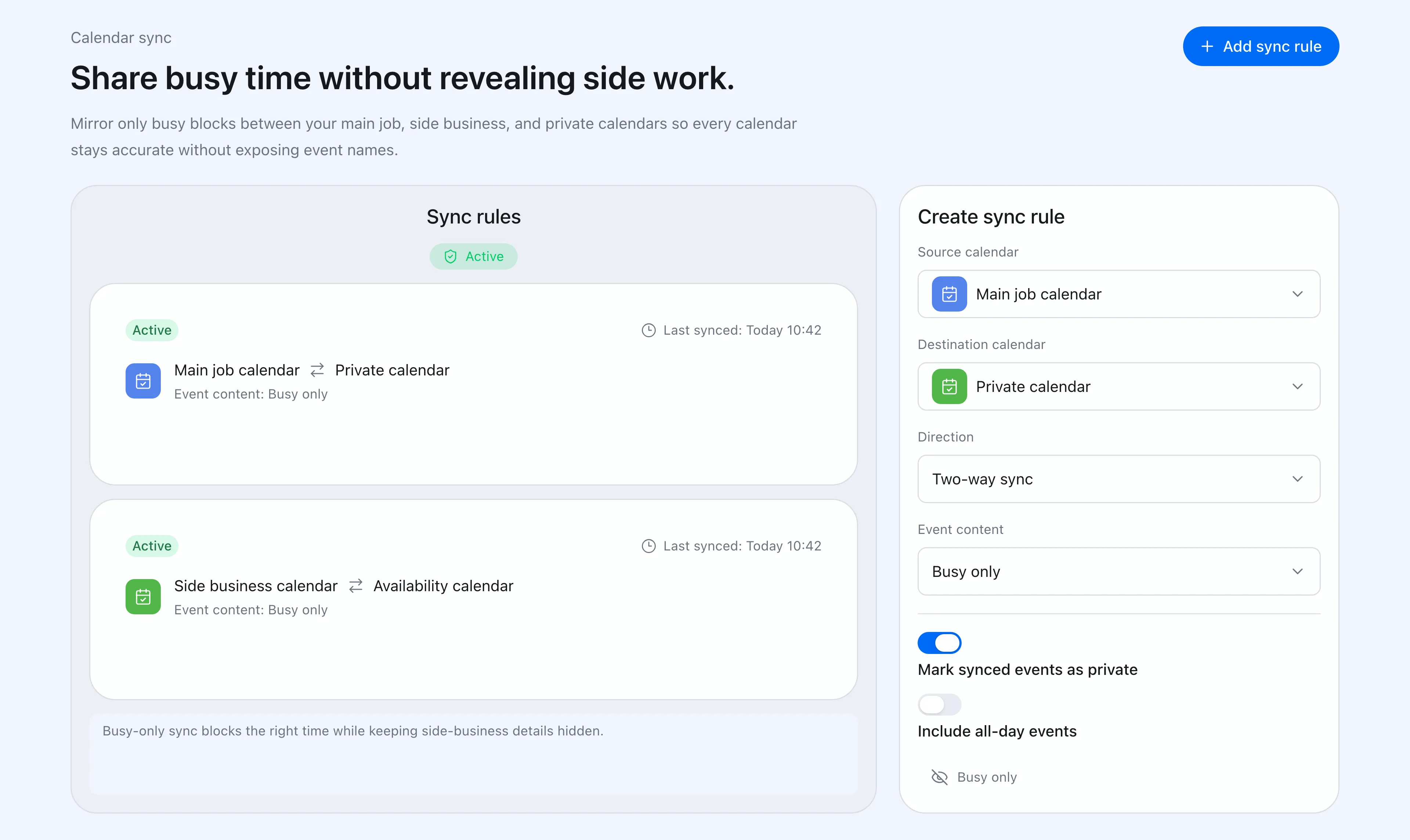 Sync rules control direction and how much event detail reaches the destination calendar.
Candidate times and post-booking context
Chronock’s candidate dates tool turns availability into copy-friendly text for email or chat, with Pro holds protecting proposed times. Booking history, contacts, and notes keep post-booking context in the same place.
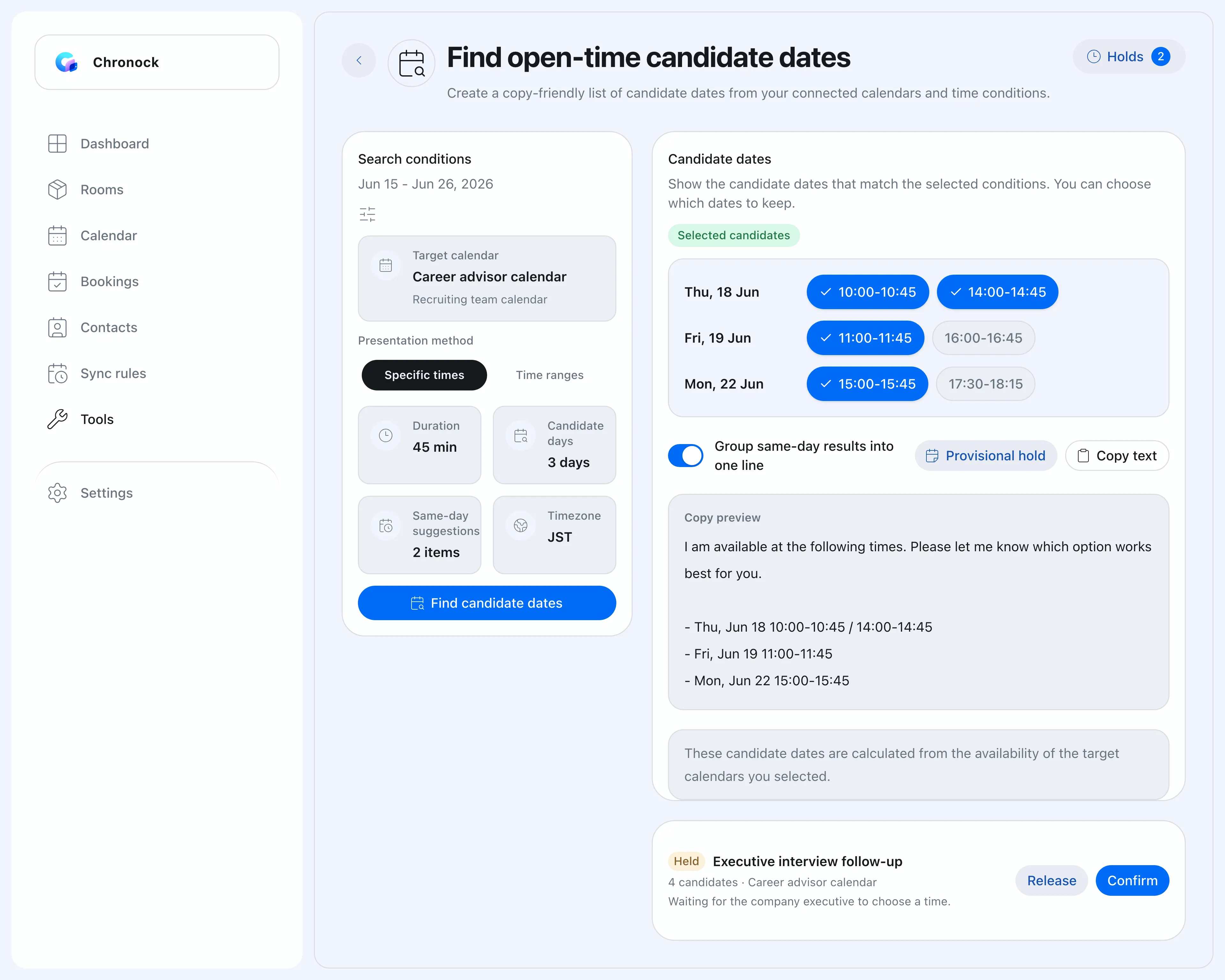 Candidate times as text, with Pro holds protecting them until confirmed.
What to watch with Chronock
Chronock syncs Google Calendar and Microsoft Outlook calendars (Microsoft 365 work or school accounts) — iCloud is not supported. Chronock’s Outlook integration works with Microsoft 365 work or school accounts. Personal Microsoft accounts (such as Outlook.com) are not supported due to Microsoft API limitations. If iCloud calendars or Outlook on a personal Microsoft account are part of your setup, SyncThemCalendars covers them today and Chronock does not.
Chronock’s sync configuration focuses on common visibility levels rather than SyncThemCalendars’ field-by-field masking. The Free plan includes one one-way, busy-only rule; multiple rules, two-way sync, and title or description visibility require Pro.
Before choosing Chronock, check:
- Whether all calendars you need to sync are on Google or Microsoft 365 (work or school accounts).
- Whether visibility-level controls are granular enough for your case.
- Whether you will actually use the scheduling side — if not, a pure sync tool may be cheaper.
Which should you choose?
| Situation | Easier choice |
|---|---|
| Sync involving iCloud or personal Microsoft accounts | SyncThemCalendars |
| Cheapest pure sync for a few calendars | SyncThemCalendars Basic |
| Field-level masking of synced events | SyncThemCalendars |
| Sync plus booking pages in one tool | Chronock Pro |
| Availability detection across Google and Outlook calendars for free | Chronock |
| Candidate times and booking history alongside sync | Chronock Pro |
Bottom line
SyncThemCalendars is a well-priced specialist: calendar sync across Google, Outlook, and iCloud with fine privacy control and nothing else to learn. If sync is your entire problem — or iCloud and personal Microsoft accounts are involved — it is an easy tool to recommend.
Chronock bundles calendar sync — Google-to-Google, Outlook-to-Outlook, and cross-provider Google-to-Outlook — into a scheduling workflow with booking pages, candidate times, holds, and history, so the double-booking fix and the booking experience come from one product.
If your setup includes iCloud or personal Microsoft accounts and you only need mirroring, pick SyncThemCalendars. If your calendars are on Google or Microsoft 365 and scheduling is part of the job, pick Chronock.