How to schedule job interviews while working full time
Interview scheduling is the hidden grind of job hunting while employed. How to send time options to recruiters, handle weekday interviews, and keep your job search invisible on your work calendar.
Dieser Artikel ist derzeit nur auf Englisch verfügbar.
When you job-hunt while employed, scheduling interviews drains as much energy as preparing for them.
You answer recruiter messages between meetings, send candidate times to each company, and the volume grows with every round you pass. Meanwhile your work calendar keeps changing, so the times you offered on Monday may be gone by Thursday.
This article covers the practical side of interview scheduling while employed: working with recruiters, surviving weekday interviews, and managing your calendars so your job search stays private.
Why interview scheduling is uniquely painful
Three structural reasons make this harder than normal meeting scheduling.
- The communication chain is long. With a recruiter or agency in the middle, your availability travels “you → recruiter → hiring coordinator → interviewers” and back. One round trip can take days.
- Interviews happen during business hours. You are employed during exactly those hours, and your work meetings compete with interview slots for the same time.
- Parallel processes collide. Interviewing with several companies means the times you offered company A are silently at risk of being taken by company B. Double-booking yourself is a real and embarrassing possibility.
Given that structure, two things matter most: sending accurate time options fast, and keeping a single source of truth for your availability.
Working with recruiters: send better time options
Because every exchange passes through intermediaries, the quality of each message determines how fast things move.
Offer batches of windows, not single slots
“Tuesday at 3pm works” forces another round trip when it doesn’t. Offer at least 3–5 windows with ranges — “Tue Jul 14, 3:00–6:00pm”, “Thu Jul 16, unavailable all day” — including the days that never work.
Put an expiry on your offers
Times you offer are effectively on hold until someone replies. Adding “these times are valid until Friday” reduces collisions when you interview with several companies in parallel.
Match their communication channel
Recruiter scheduling rewards speed. If the recruiter works over a chat tool or scheduling app rather than email, following their channel usually gets you confirmed faster.
For the mechanics of writing availability into an email, see how to share available times instead of a scheduling link and scheduling-link etiquette.
One etiquette note: as a candidate, sending a booking link to a hiring manager or recruiter reads as presumptuous in most contexts. Written time options are the safe default.
When you cannot take weekdays off
“I can’t get weekdays off for interviews” is the most common complaint of employed job seekers. The realistic options:
Default to video interviews
Early rounds are video calls almost everywhere now. If you can carve out 30–60 minutes around lunch or a work-from-home day, many processes can advance without touching your vacation days. Tell the recruiter up front that you prefer video for early rounds.
Ask about early-morning and evening slots
Companies interview employed candidates all the time; 8am or after-6pm slots are often possible. It costs nothing to state your preferred windows.
Spend days off in bulk, late in the process
Rather than taking repeated half-days, save your time off for final rounds and onsite interviews, and stack two or three companies on the same day off. To make that stacking possible, ask your recruiter to keep the timelines of your parallel processes roughly aligned.
“Personal appointment” is a complete explanation
You do not owe your employer details. Job searching while employed is normal, and “I have a personal appointment” is all the explanation a calendar block needs.
Keep your job search off your work calendar
The overlooked risk in a stealth job search is your own calendar hygiene.
Typing “Interview — Acme Corp” into your work Google Calendar is the obvious mistake. But a week suddenly full of vague “personal” blocks also tells a story to an observant coworker. And leaving interview times empty is worse: someone will book a meeting right on top of them.
The safe setup:
- Keep all job-search events on your personal Google Calendar only. Company names and the word “interview” never touch your work account.
- Put plain busy blocks on your work calendar. A block with no title and no details is indistinguishable from any other errand.
- Check your work calendar’s sharing settings. If your organization defaults to showing event details to coworkers, learn how the private-visibility setting works.
We cover the built-in options in how to share only free/busy and hide details in Google Calendar.
The catch: manually mirroring every interview to your work calendar as a busy block is exactly the kind of repetitive task that breaks down as your search intensifies. Interview times change on short notice, and a forgotten copy — or a stale one — turns directly into a double booking.
Automate the busy blocks and the availability math
Chronock, a scheduling and calendar-sync tool, automates this setup, and the Free plan covers individual use.
Sync your personal calendar to your work calendar, busy-only
One sync rule makes every interview on your personal calendar appear on your work calendar as an untitled busy block — automatically, including reschedules and cancellations. Your work calendar never shows a company name or the word “interview”. This works even when your employer runs on Outlook: Chronock syncs across providers, from a personal Google Calendar to an Outlook work calendar (Microsoft 365 work or school accounts).
Find open times across all your calendars at once
Chronock connects multiple calendars — Google Calendar and Microsoft Outlook (Microsoft 365) — and computes availability across all of them. Time options come only from slots that are free on both your work and job-search calendars, which is the structural fix for “I offered the same slot to two companies”.
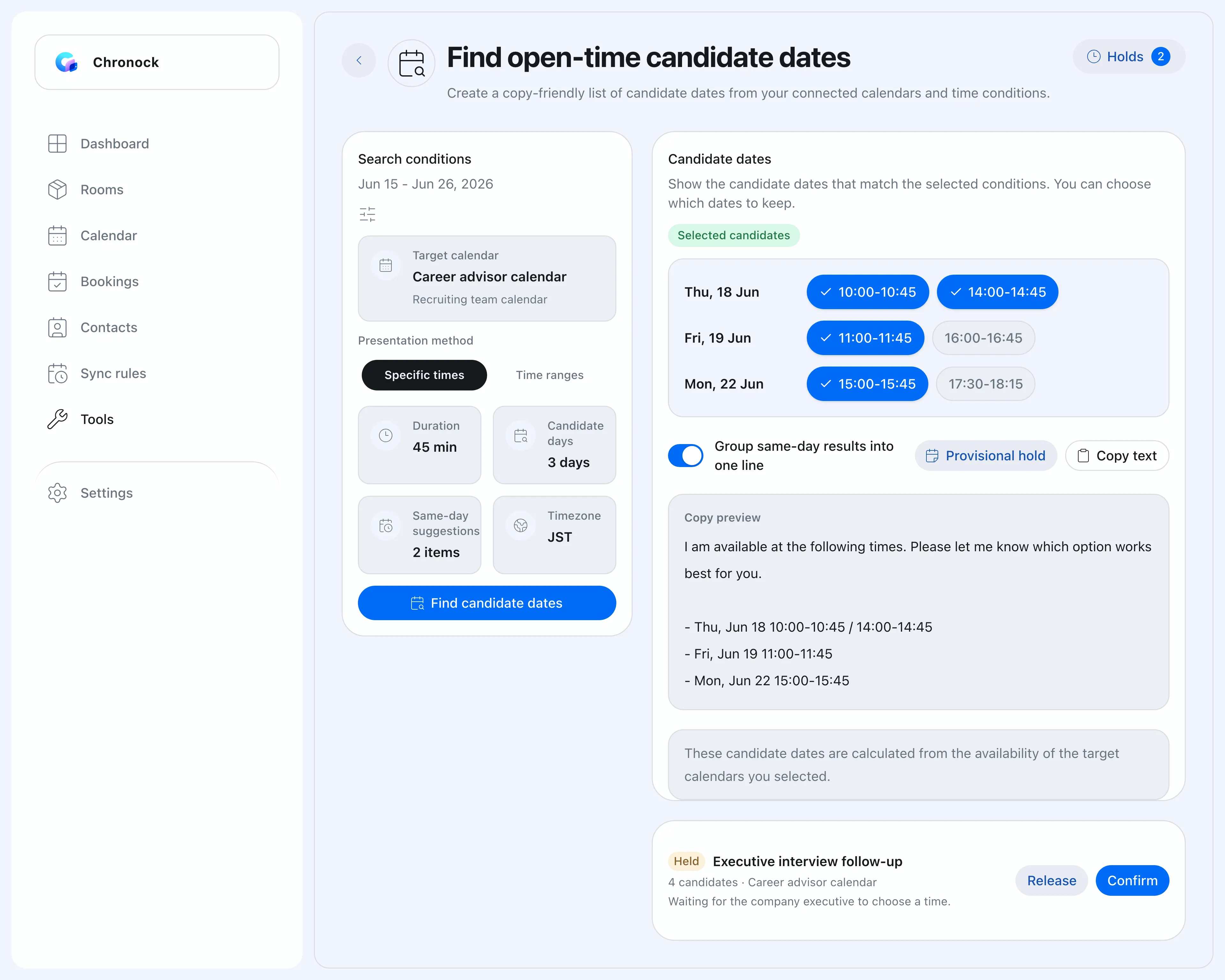 Search your availability and copy it as ready-to-paste candidate times.
Copy availability as ready-to-paste text
The open slots you find can be exported as a formatted list of candidate times, ready to paste into a recruiter email. The “3–5 windows with ranges” best practice goes from minutes of calendar-squinting to seconds.
This article is written from the candidate’s side. If you are the recruiter or agency drowning in coordination instead, see our use case for recruitment agencies.
Turn scheduling from a chore into a system
The three problems and their fixes:
| Problem | Fix |
|---|---|
| Slow recruiter round trips | Offer 3–5 time windows with ranges, blocked days, and an expiry |
| No weekdays off | Video for early rounds, morning/evening slots, save days off for finals |
| Job search visible at work | Interviews live on your personal calendar; busy-only sync to work |
A job search runs for weeks or months. Instead of grinding through each coordination email, set up the availability system once and spend your attention on the interviews themselves.
Chronock’s Free plan includes multi-calendar availability detection, copyable candidate-time text, and one one-way, busy-only calendar sync rule — enough to run a full job search, even if you only use it for the duration.