TidyCal vs Chronock: Scheduling Tools Compared
A fair comparison of TidyCal and Chronock across lifetime vs subscription pricing, free plans, supported calendars, calendar sync, and booking workflows, as of July 2026.
本文目前僅提供英文版。
TidyCal is a scheduling tool from AppSumo, best known for its lifetime pricing: a one-time $29 or $79 payment instead of a monthly subscription. For budget-conscious freelancers and solopreneurs, that model is genuinely appealing.
Chronock is a scheduling and calendar sync tool built around Google Calendar, with Microsoft Outlook calendars (Microsoft 365 work or school accounts) also supported: booking pages, availability across multiple calendars, candidate-time text, calendar-to-calendar event sync, and post-booking management.
This article is published on Chronock’s own blog, so fairness matters. The information below is current as of July 10, 2026. It is based on TidyCal’s official pricing page and help center plus Chronock’s published features. Pricing and features may have changed since, so always check each service’s latest pages before deciding.
Short answer
Choose TidyCal if you want the lowest possible lifetime cost for booking pages. A one-time $29 buys unlimited booking types, ten calendar connections across Google, Microsoft, and Apple, and even paid bookings via Stripe or PayPal — with no recurring bill.
Choose Chronock if your work is centered on Google Calendar or Outlook (Microsoft 365) and you want more than booking pages: calendar-to-calendar sync to prevent double bookings — including cross-provider Google-to-Outlook — candidate times you can paste into email with provisional holds, and booking history with contacts.
| Choose | Best fit |
|---|---|
| TidyCal | You want booking pages at a one-time price, take payments at booking, or need Apple calendars or personal Microsoft accounts included cheaply. |
| Chronock | You live in Google Calendar or Outlook (Microsoft 365) and want booking pages plus event sync, candidate times, and post-booking management. |
Comparison table
| Area | TidyCal | Chronock |
|---|---|---|
| Supported calendars | Google Calendar, Microsoft 365 / Outlook.com, Apple Calendar via CalDAV | Google / Outlook (Microsoft 365) |
| Free plan | Unlimited booking types and bookings, Stripe/PayPal payments, 1 calendar connection, TidyCal branding | One user, one booking slot, booking pages, multiple calendar connections (Google / Outlook), automatic availability detection, Zoom and Slack integrations |
| Pricing model | One-time: Individual $29 (10 calendars), Agency $79 (25 calendars, round-robin and collective). Subscription: Pro $12/month or $99/year (no branding, custom domain) | Subscription: Free $0; Pro $9/user/month or $80/user/year ($6.67 effective monthly) |
| Team scheduling | Round-robin and collective meetings on the Agency tier | Multi-person scheduling on Pro. Round-robin is planned |
| Payments at booking | Stripe and PayPal on all plans, including free | Focused on scheduling, candidate times, sync, and post-booking management |
| Calendar-to-calendar sync | Not offered — TidyCal reads busy times and writes bookings to your primary calendar | One one-way, busy-only sync rule on Free. Pro adds multiple rules, two-way sync, and title/description sync |
| Candidate-time text | Focused on booking links | Candidate dates tool with copy-friendly text. Pro adds provisional holds |
| Post-booking management | Booking list and analytics (Individual and up) | Booking history, contacts, and CRM on Pro |
| Mobile app | No native app; responsive web | Primarily a web app |
| Webhooks / API | REST API; no native webhooks (Zapier and similar platforms cover automation) | Zoom and Slack integrations; publicly documented integrations are evolving |
| Booking page languages | 30+ languages selectable; admin UI is English | Japanese, English, and Traditional Chinese UI |
Where TidyCal is strong
TidyCal’s core appeal is simple: a lot of scheduling for very little money, paid once.
The official pricing page lists a free plan with unlimited booking types, unlimited bookings, and Stripe/PayPal payment collection — features many competitors reserve for paid tiers. The Individual lifetime tier is $29 one-time and adds ten calendar connections, automatic Zoom / Google Meet / Microsoft Teams links, group bookings, and custom email notifications. The Agency lifetime tier at $79 one-time adds round-robin and collective meetings, a team booking page, and 25 calendar connections.
Calendar support is broad for the price: Google, Microsoft 365 / Outlook.com, and Apple Calendar via CalDAV (official help). Purchases through AppSumo carry a 60-day refund guarantee, which lowers the risk of trying it.
TidyCal is especially compelling when:
- You want to pay once and stop thinking about scheduling software costs.
- You take payments at booking time, even on a free plan.
- Your calendars include Apple Calendar or personal Microsoft accounts (Outlook.com).
- You need round-robin or collective team bookings at a one-time price.
What to watch with TidyCal
The trade-offs are mostly about scope, not quality.
TidyCal does not sync events between calendars. It reads busy times from connected calendars and writes new bookings to your primary calendar; continuously mirroring work events into a personal calendar as busy blocks is outside its scope.
There is no native mobile app — the responsive web app is the interface — and no native webhooks; automation runs through Zapier and similar platforms via the REST API. Full removal of TidyCal branding requires the Pro subscription ($12/month or $99/year) rather than the lifetime tiers, and the admin UI is English-only, though booking pages themselves can display in 30+ languages.
Before adopting TidyCal, check:
- Whether you need calendar-to-calendar event sync.
- Whether reduced (rather than removed) branding on lifetime tiers is acceptable.
- Whether web-only access and Zapier-based automation fit your workflow.
- Whether you need candidate-time text or post-booking contact management.
None of these are defects; they are the boundaries of a deliberately lean, one-time-priced product.
Pricing comparison
As of July 2026, TidyCal’s official pricing page lists the free plan, the $29 Individual and $79 Agency lifetime tiers, and the Pro subscription at $12/month or $99/year.
| Service / plan | Price |
|---|---|
| TidyCal Free | $0 |
| TidyCal Individual | $29 one-time |
| TidyCal Agency | $79 one-time |
| TidyCal Pro | $12/month or $99/year |
| Chronock Free | $0 |
| Chronock Pro | $9/user/month, or $80/user/year ($6.67 effective monthly) |
On raw cost, a one-time $29 beats any subscription over time — if the features you need are in that tier. Chronock Pro’s $80/year buys a different bundle: calendar-to-calendar sync, provisional holds, CRM, booking history, and team management. The honest comparison is not “cheaper vs pricier” but “booking pages at a one-time price” vs “a calendar workflow on subscription.”
Where Chronock is strong
Chronock’s advantage is treating scheduling as part of your calendar operation, not just a booking page. Google Calendar remains its primary, most mature provider, with Microsoft Outlook calendars (Microsoft 365 work or school accounts) supported as well.
The Free plan includes one user, one booking slot, booking-page creation, multiple calendar connections across Google and Outlook, and automatic availability detection.
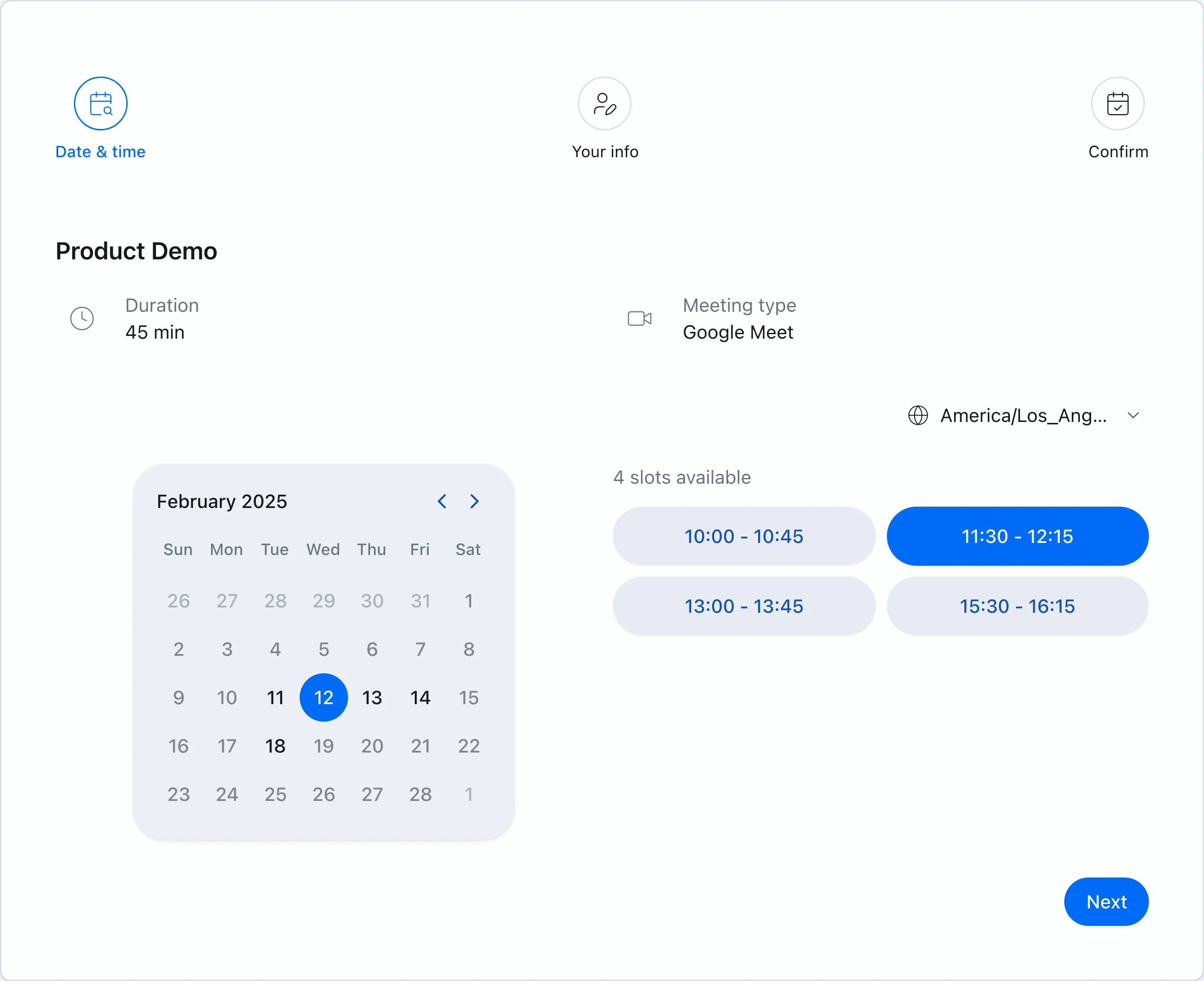 Chronock booking pages show only genuinely available times based on your connected calendars.
Calendar-to-calendar sync against double bookings
Chronock lets you create sync rules between calendars — Google-to-Google, Outlook-to-Outlook, and cross-provider Google-to-Outlook. The Free plan includes one one-way, busy-only rule; Pro adds multiple rules, two-way sync, and the option to show titles or descriptions at the destination. Work stays blocked when personal events land, without exposing private details.
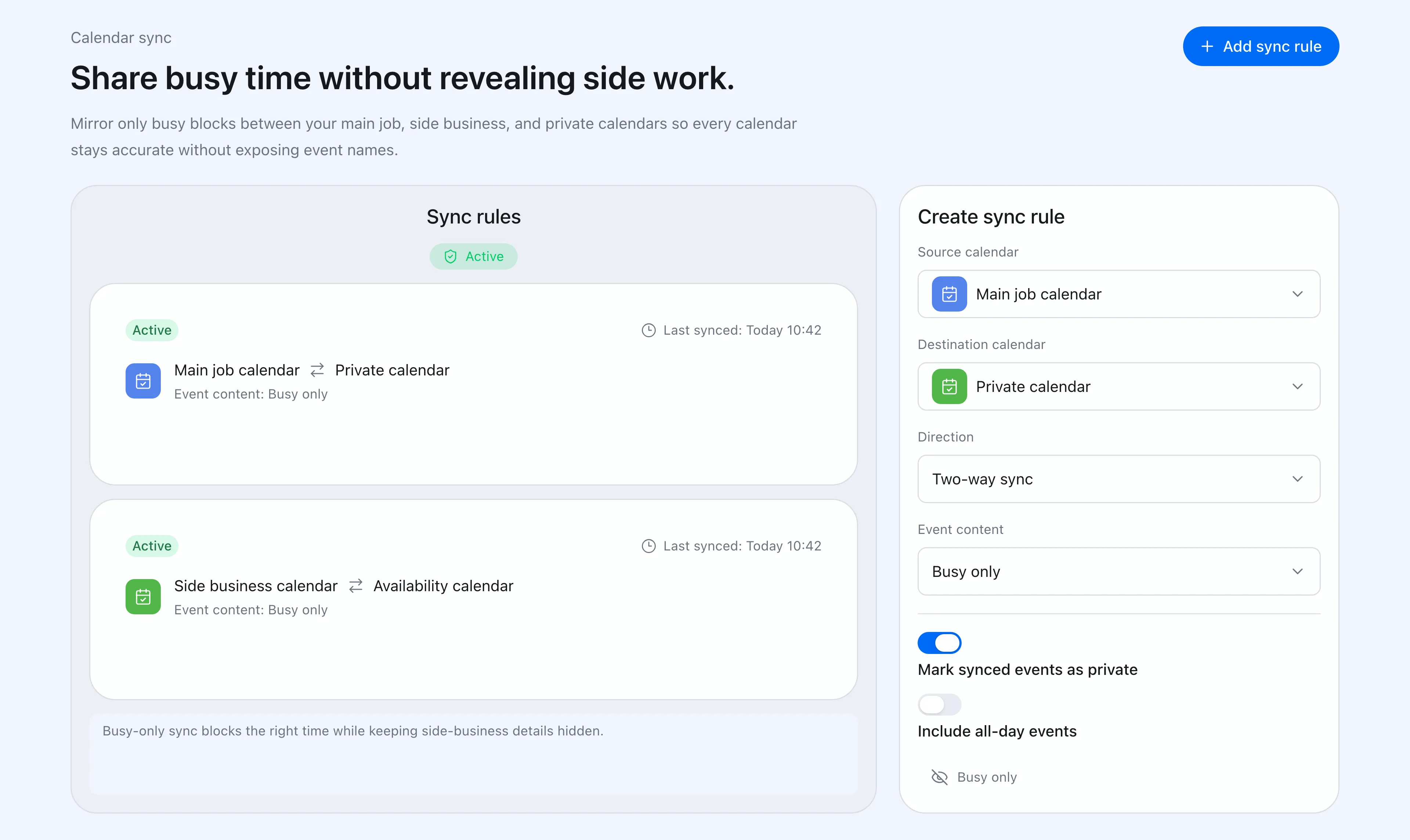 Sync rules control direction and how much event detail reaches the destination calendar.
If you currently pair a booking tool with a separate calendar sync service, Chronock covers both jobs in one product.
Candidate times as text, with holds
Some clients prefer “would any of these three times work?” in an email over a booking link. Chronock’s candidate dates tool builds copy-friendly text from real availability, and Pro’s provisional holds protect proposed times while you wait for a reply.
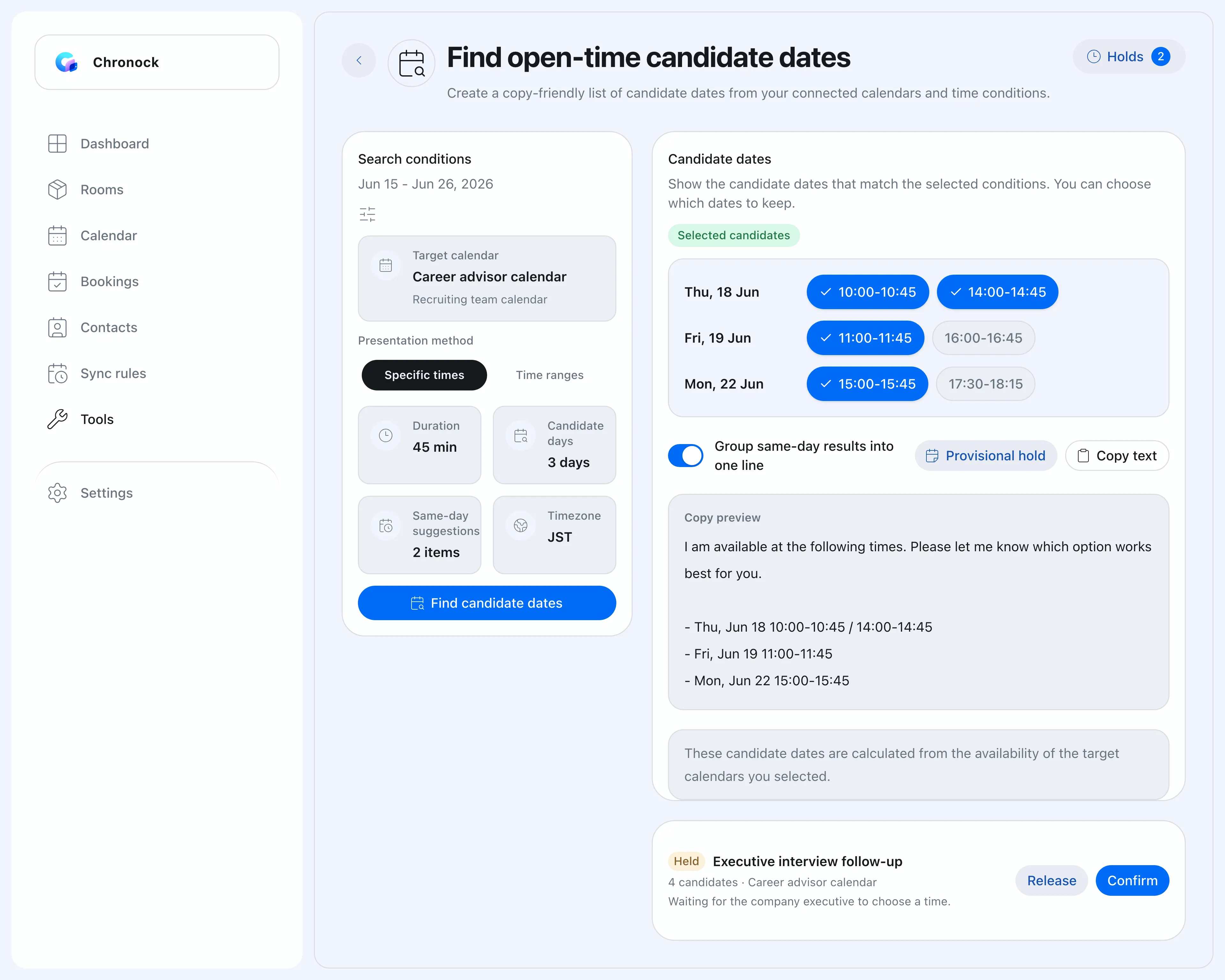 When texting candidate times fits better than a link, you have both options.
Booking history and contacts in the same tool
Chronock Pro includes booking history, contacts, and notes as CRM-style context — who booked, what history exists, what comes next — alongside your scheduling.
What to watch with Chronock
Chronock supports Google Calendar and Microsoft Outlook calendars (Microsoft 365 work or school accounts); there is no Apple Calendar support. Chronock’s Outlook integration works with Microsoft 365 work or school accounts. Personal Microsoft accounts (such as Outlook.com) are not supported due to Microsoft API limitations. If your calendars include Apple Calendar or a personal Microsoft account, TidyCal covers them now at a lower price.
Chronock also does not take payments at booking time, its Free plan includes one booking slot rather than unlimited booking types, and it is subscription-priced — there is no lifetime tier.
Before choosing Chronock, check:
- Whether Google and Microsoft 365 Outlook coverage is enough (no Apple Calendar or personal Microsoft accounts).
- Whether payments at booking are required.
- Whether one free booking slot covers your needs, or Pro is warranted.
- Whether sync, candidate times, and CRM justify a subscription for you.
Which should you choose?
| Situation | Easier choice |
|---|---|
| Lowest lifetime cost for booking pages | TidyCal |
| Payments at booking, even for free | TidyCal |
| Apple calendars or personal Microsoft accounts included cheaply | TidyCal |
| Round-robin at a one-time price | TidyCal Agency |
| Availability across multiple Google and Outlook calendars for free | Chronock |
| Calendar-to-calendar sync against double bookings | Chronock (one rule on Free, more on Pro) |
| Candidate times pasted into email, with holds | Chronock Pro |
| Booking history and contacts alongside scheduling | Chronock Pro |
Bottom line
TidyCal delivers an unusual amount of scheduling for a one-time payment: unlimited booking types, broad calendar support, and payments included even on the free plan. If a booking page is the whole job, it is one of the best-value options anywhere.
Chronock is built for people whose whole scheduling life runs on Google Calendar or Outlook (Microsoft 365): booking pages plus multi-calendar availability, event sync, candidate times with holds, and post-booking management in one subscription.
If you want a booking page at the lowest lifetime cost, pick TidyCal. If you want your Google and Outlook calendars, booking pages, and follow-through working as one system, pick Chronock.