Spir vs Chronock: Scheduling Tools Compared
A fair comparison of Spir and Chronock across free plan scope, the September 2025 plan changes, supported calendars, scheduling types, calendar sync, and pricing, as of July 2026.
本文目前僅提供英文版。
Spir is a Japanese scheduling tool known for its variety of scheduling types — polls, manual candidate selection, group-based assignment, and more. Operated by Spir, Inc., it reports 400,000 users and takes a “calendar platform” approach where teams coordinate around a shared calendar view.
Chronock also builds scheduling links on top of calendar availability, packaging booking pages, candidate-time text, calendar-to-calendar event sync, and post-booking management for individuals and small teams centered on Google Calendar and Microsoft Outlook (Microsoft 365).
This article is published on Chronock’s own blog, so fairness matters. The information below is current as of July 10, 2026. It is based on Spir’s official pricing page and help center plus Chronock’s published features. Pricing and features may have changed since, so always check each service’s latest pages before deciding.
Short answer
Choose Spir if you want many scheduling types — including polls and manual candidates — or team-wide calendar sharing. Its Team plan keeps evolving toward business use, with conditional forms and a three-party scheduling trial.
Choose Chronock if you are an individual or small team centered on Google Calendar or Outlook (Microsoft 365) and want event sync against double bookings, provisional holds for proposed times, and booking history at a lower price point.
| Choose | Best fit |
|---|---|
| Spir | You need polls and varied scheduling types, team calendar sharing, or enterprise security reviews. |
| Chronock | You live in Google Calendar or Outlook (Microsoft 365) and want sync, provisional holds, and post-booking management in one affordable tool. |
Comparison table
| Area | Spir | Chronock |
|---|---|---|
| Supported calendars | Google Calendar and Outlook Calendar | Google / Outlook (Microsoft 365 work or school accounts) |
| Calendar connections | Multiple calendars and accounts from the Free plan | Multiple Google and Outlook calendar connections with combined availability detection, from the Free plan |
| Free plan | Up to 3 availability links and 2 users. Unlimited schedulings, polls, candidate-time text export, Slack notifications | One user, one booking slot, booking pages, multiple calendar connections, automatic availability detection, Zoom and Slack integrations |
| Scheduling types | One-on-one, all-members, any-one-member (priority or even assignment), group choice, manual candidates, polls, three-party trial | Booking slots, multi-person scheduling, candidate-time text. Round-robin is planned |
| Candidate-time text | Text export included from the Free plan | Candidate dates tool with copy-friendly text. Pro adds provisional holds |
| Calendar-to-calendar sync | Not offered | One one-way, busy-only sync rule on Free. Pro adds multiple rules, two-way sync, and title/description sync |
| Embeds, webhooks, custom forms | Team plan (moved out of Free in the September 25, 2025 plan revision) | Booking pages from Free. CRM and team management on Pro |
| Post-booking management | Focused on confirming and notifying | Booking history, contacts, and CRM on Pro |
| Languages | Japanese and English | Japanese UI and support, plus English and Traditional Chinese |
| Pricing | Free ¥0; Team ¥1,200/month per seat billed annually or ¥1,500 monthly (tax excluded); Enterprise on request | Free $0. Pro is $9/user/month or $80/user/year ($6.67 effective monthly) |
Where Spir is strong
Spir’s biggest advantage is the range of scheduling types.
According to the official pricing page, it covers one-on-one, all-participants, any-one-member with priority or even assignment, choosing one group among several, manually picked candidates, and poll-style voting. A three-party scheduling feature is in early trial, targeting meetings that span multiple companies.
Multiple calendar and account connections are available from the Free plan, across both Google and Outlook, which suits people who schedule across organizations. Candidate-time text export is also included in Free — a thoughtful option when sending a link feels too formal.
For teams, a shared calendar view with permission controls lets members coordinate visually. Spir holds ISMS (ISO/IEC 27001) certification, and the Enterprise plan adds security-review support and onboarding — relevant for corporate procurement.
Spir is especially compelling when:
- You switch scheduling methods depending on the counterpart — polls, manual candidates, links.
- Your team coordinates around one shared calendar view.
- Multi-company scheduling is routine.
- Corporate security reviews and onboarding support matter.
What to watch with Spir
Spir revised its plans on September 25, 2025, introducing per-seat billing and annual contracts (official help center). At the same time, several features moved out of the Free plan into Team: website embedding, webhooks, custom question forms, event-title customization, post-confirmation redirects, and delegated event editing.
Today’s Free plan allows up to 3 availability links and 2 users. Unlimited schedulings and polls remain free, which covers basic individual use, but workflows that rely on embeds or webhooks now require the Team plan.
Spir also does not copy or sync events between calendars. Its double-booking prevention reads availability from connected calendars, so mirroring work events into a personal calendar as busy blocks is outside its scope, and post-booking history or contact management is not its focus.
Before adopting Spir, check:
- Whether the Free scope (3 links, 2 users) is enough, or the Team price is justified for you.
- Whether embeds, webhooks, or custom forms are required.
- Whether you need calendar-to-calendar event sync.
- Whether managing booking history and contacts in a separate tool is acceptable.
These are design decisions of a product shifting toward team and business scheduling, not defects. If varied scheduling types and team features are what you need, the Team plan’s price has a rationale.
Pricing comparison
Spir’s pricing is tax-excluded JPY. As of July 2026, the official pricing page lists Free at ¥0 and Team at ¥1,200/month per seat billed annually (¥1,500 monthly), with a 30-day unrestricted trial after signup.
| Service / plan | Price |
|---|---|
| Spir Free | ¥0 (3 availability links, up to 2 users) |
| Spir Team | ¥1,200/month per seat annually, ¥1,500 monthly (tax excluded) |
| Spir Enterprise | On request |
| Chronock Free | $0 |
| Chronock Pro | $9/user/month, or $80/user/year ($6.67 effective monthly) |
Chronock Pro’s annual price ($6.67 effective monthly) sits below Spir Team’s, but the two spend the money differently. Spir Team buys scheduling sophistication — varied types, shared calendar views, conditional forms. Chronock Pro buys calendar operations — event sync, provisional holds, CRM, and booking history.
Where Chronock is strong
Chronock treats scheduling across Google Calendar and Outlook (Microsoft 365) as one continuous, affordable workflow.
The Free plan includes one user, one booking slot, booking-page creation, multiple calendar connections, and automatic availability detection.
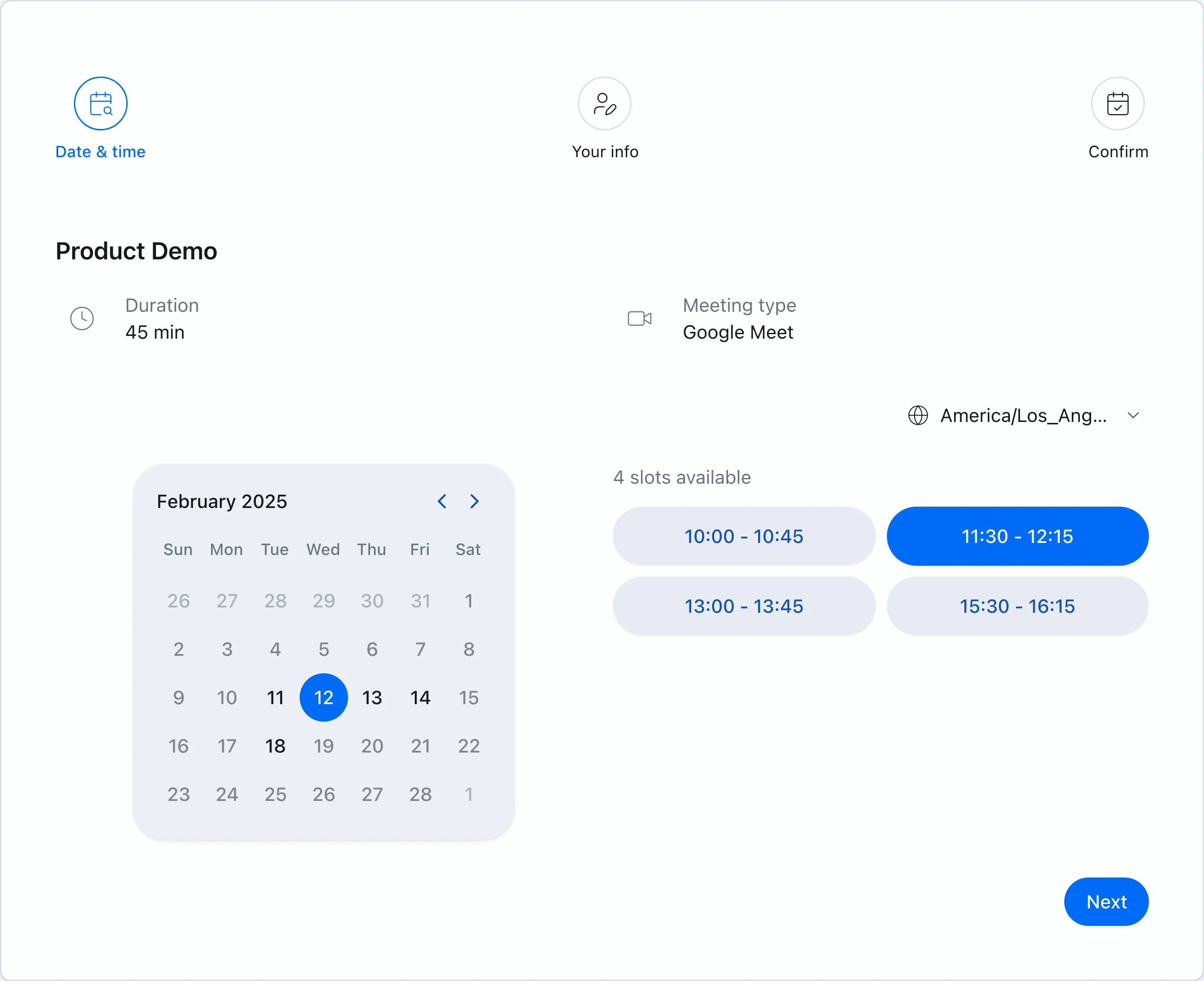 Chronock booking pages show only genuinely available times based on your connected calendars.
Calendar-to-calendar sync against double bookings
Chronock lets you create sync rules between calendars — Outlook↔Outlook, Google↔Google, and cross-provider Google↔Outlook. The Free plan includes one one-way, busy-only rule; Pro adds multiple rules, two-way sync, and the option to show titles or descriptions at the destination. You can block time at work without exposing private details.
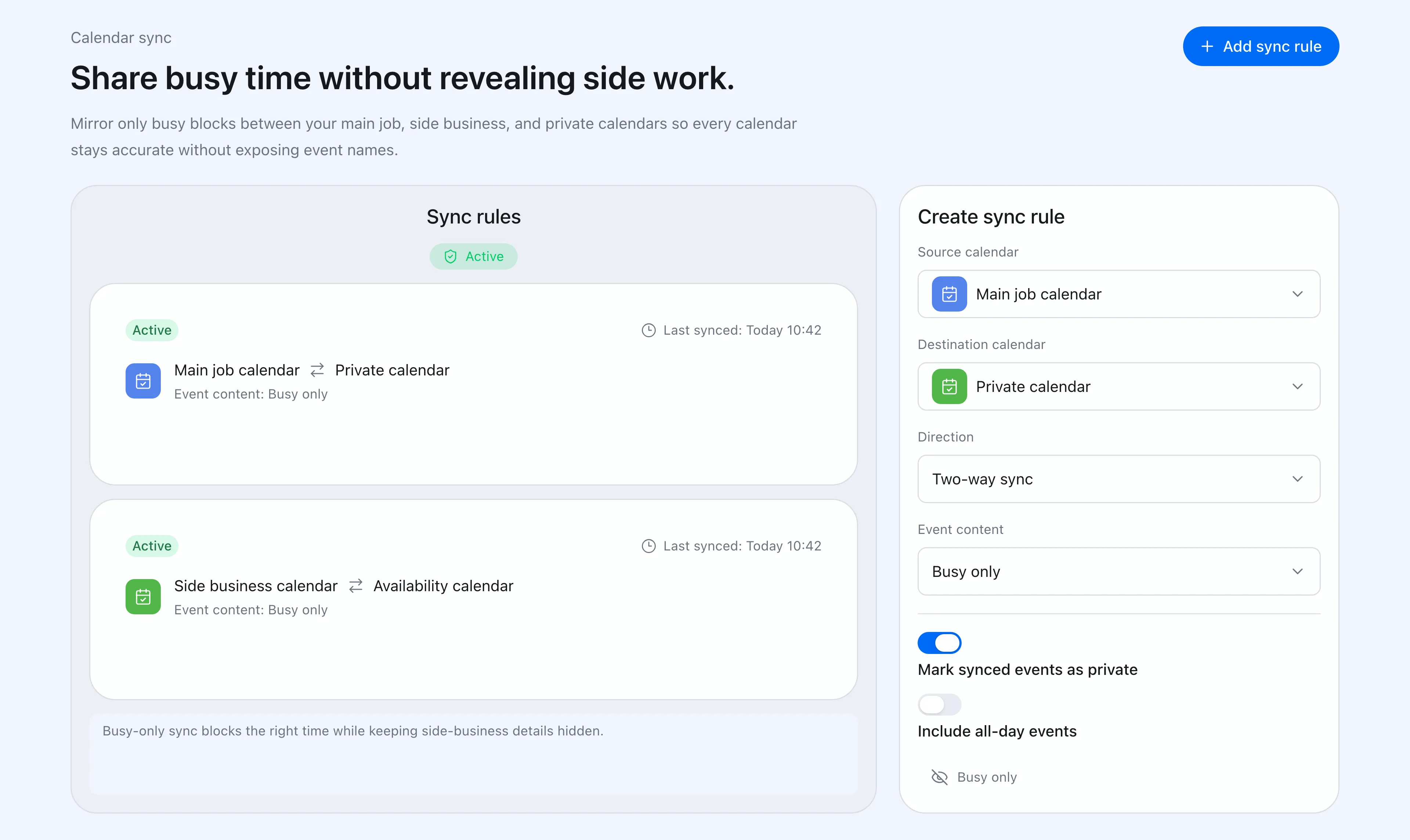 Sync rules control direction and how much event detail reaches the destination calendar.
Provisional holds for proposed times
Spir also exports candidate times as text, but Chronock Pro goes one step further with provisional holds: proposed times are protected on your calendar while you wait for a reply, reducing the classic race condition of scheduling by email.
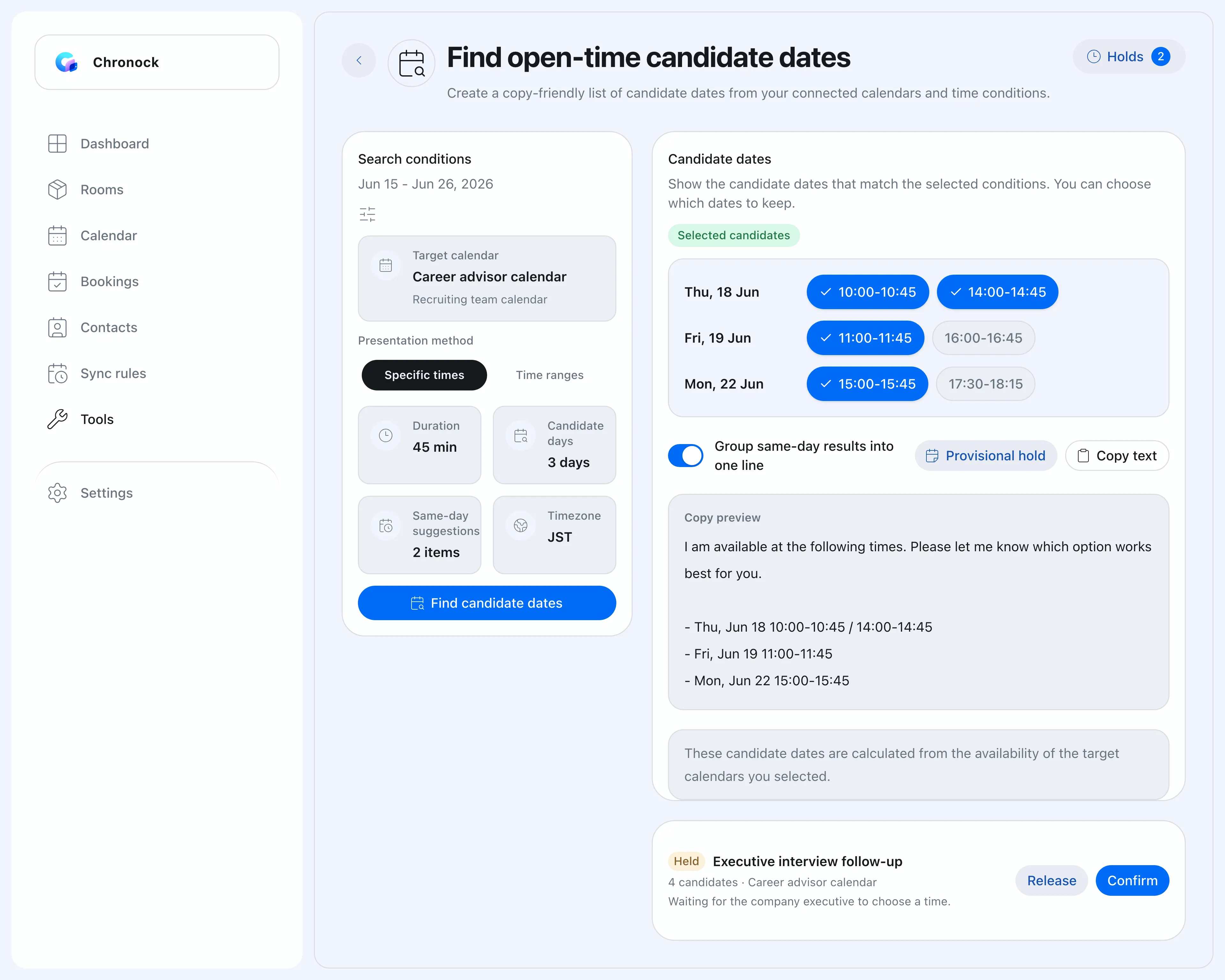 Candidate times as text, with Pro holds protecting them until confirmed.
Booking history and contacts in the same tool
Chronock Pro includes booking history, contacts, and notes as CRM-style context — useful for freelancers and small teams who want who-met-whom and what-comes-next to live next to their scheduling.
What to watch with Chronock
Chronock supports Outlook calendars alongside Google Calendar, but with a scope worth checking: Chronock’s Outlook integration works with Microsoft 365 work or school accounts. Personal Microsoft accounts (such as Outlook.com) are not supported due to Microsoft API limitations. iCloud Calendar is not supported either.
Chronock has no poll-style scheduling, and its Free plan includes one booking slot versus Spir’s three availability links. If you decide dates by vote or want several free links, Spir fits better.
Before choosing Chronock, check:
- Whether Google Calendar and Outlook (Microsoft 365) cover the calendars you use.
- Whether polls, group choice, or three-party scheduling are must-haves.
- Whether you need a team-wide shared calendar view.
- Whether sync, provisional holds, and CRM matter to you.
Which should you choose?
| Situation | Easier choice |
|---|---|
| Varied scheduling types including polls | Spir |
| Outlook Calendar in availability checks | Spir, Chronock (Microsoft 365) |
| Team coordination around a shared calendar view | Spir Team |
| Frequent multi-company scheduling | Spir (three-party trial) |
| Corporate security reviews and onboarding | Spir Enterprise |
| Google Calendar-centric, low-cost start | Chronock |
| Calendar-to-calendar sync against double bookings | Chronock (one rule on Free, more on Pro) |
| Provisional holds for proposed times | Chronock Pro |
| Booking history and contacts alongside scheduling | Chronock Pro |
Bottom line
Spir is a polished scheduling platform built around varied scheduling types and team calendar sharing. Since its September 2025 plan revision it has leaned further into team and business use, and organizations with those needs will find it a strong option.
Chronock focuses on Google Calendar and Outlook (Microsoft 365) and uses that focus to combine multi-calendar availability, event sync, provisional holds, and post-booking management at an individual-friendly price.
For scheduling variety and team features, pick Spir. For Google or Outlook calendar-centered scheduling with sync and follow-through at a lower price, pick Chronock.