Cal.com vs Chronock: Scheduling Tools Compared
A fair comparison of Cal.com and Chronock across free plans, team features, the 2026 open-source changes, calendar sync, and pricing, as of July 2026.
この記事は現在、英語版のみ公開されています。
Cal.com is one of the most capable scheduling platforms available. Its hosted free plan for individuals is remarkably generous — unlimited event types and unlimited calendar connections at $0 — and its paid tiers reach deep into team scheduling, routing, and enterprise compliance.
Chronock is a scheduling and calendar sync tool built around Google Calendar, with Microsoft Outlook calendars (Microsoft 365 work or school accounts) also supported: booking pages, availability across multiple calendars, candidate-time text, calendar-to-calendar event sync, and post-booking management.
This article is published on Chronock’s own blog, so fairness matters. The information below is current as of July 10, 2026. It is based on Cal.com’s official pricing page, documentation, and blog plus Chronock’s published features. Pricing and features may have changed since, so always check each service’s latest pages before deciding.
Short answer
Choose Cal.com if you want a full-featured scheduling platform: unlimited event types for free, broad calendar support including Apple and CalDAV, round-robin and routing forms for teams, a mobile app, developer APIs, and enterprise options up to SAML SSO and HIPAA. For an individual who only needs booking links, Cal.com’s free plan is one of the strongest offers on the market — we say that plainly.
Choose Chronock if your work is centered on Google Calendar or Outlook (Microsoft 365) and you want scheduling plus things Cal.com does not focus on: calendar-to-calendar event sync to prevent double bookings — including cross-provider Google-to-Outlook — candidate times as text with provisional holds, and booking history with contacts — in a deliberately smaller, simpler product.
| Choose | Best fit |
|---|---|
| Cal.com | You want maximum scheduling capability, team routing, developer APIs, or enterprise compliance. |
| Chronock | You live in Google Calendar or Outlook (Microsoft 365) and want booking pages plus event sync, candidate times, and post-booking management in one lightweight tool. |
Comparison table
| Area | Cal.com | Chronock |
|---|---|---|
| Supported calendars | Google, Outlook / Office 365, Apple Calendar, CalDAV, and more | Google / Outlook (Microsoft 365) |
| Free plan | 1 user with unlimited event types and unlimited calendar connections, mobile app, Stripe/PayPal payments, 100+ integrations | One user, one booking slot, booking pages, multiple calendar connections (Google / Outlook), automatic availability detection, Zoom and Slack integrations |
| Team scheduling | Round-robin, collective, and managed event types, routing forms, workflows on the Teams plan | Multi-person scheduling on Pro. Round-robin is planned |
| Calendar-to-calendar sync | Not offered — calendars are checked for conflicts and bookings are written to a destination calendar | One one-way, busy-only sync rule on Free. Pro adds multiple rules, two-way sync, and title/description sync |
| Candidate-time text | Focused on booking links and routing | Candidate dates tool with copy-friendly text. Pro adds provisional holds |
| Post-booking management | Booking list; CRM via integrations (Salesforce, HubSpot) | Booking history, contacts, and CRM built in on Pro |
| Mobile app | iOS and Android apps | Primarily a web app |
| AI features | Cal.ai phone agents for reminders and follow-ups (usage-priced at $0.29/min) | No AI calling features |
| Self-hosting | Cal.diy community edition (MIT); Cal.com recommends it for personal, non-production use. The production codebase has been closed-source since April 2026 | Not offered |
| Languages | Booking pages localize to the visitor’s browser language; 44 locales including Japanese | Japanese, English, and Traditional Chinese UI, with Japanese support |
| Pricing | Free $0; Teams $12/user/month billed annually; Organizations $28/user/month billed annually; Enterprise custom | Free $0. Pro is $9/user/month or $80/user/year ($6.67 effective monthly) |
Where Cal.com is strong
Cal.com’s hosted free plan is hard to beat for individuals.
The official pricing page lists unlimited event types, unlimited calendar connections, email and SMS notifications, Stripe and PayPal payments, a native mobile app, and 100+ integrations — all at $0 for one user. Calendar support spans Google, Outlook, Apple Calendar, and generic CalDAV (docs), and Cal.com states that every plan allows as many calendar connections as you need.
The Teams plan ($12/user/month billed annually) adds round-robin, collective and managed event types, routing forms, customizable workflows, and branding removal. Organizations adds SAML SSO, SCIM, and compliance certifications including SOC 2, HIPAA, and ISO 27001. Booking pages localize automatically to the visitor’s browser language across 44 locales, including Japanese.
Cal.com is also pushing into AI: Cal.ai phone agents place reminder and follow-up calls, priced by usage.
Cal.com is especially compelling when:
- You want unlimited free event types across many calendar providers.
- Your team needs round-robin, routing forms, or managed event types.
- You need enterprise compliance: SSO, SCIM, SOC 2, HIPAA.
- You build on scheduling APIs or embed scheduling in your product.
- You want a native mobile app.
What to watch with Cal.com
One notable 2026 change: in April 2026, Cal.com moved its production codebase to closed source, citing AI-driven security threats. The public repository became Cal.diy, an MIT-licensed community edition without Teams, Organizations, Insights, Workflows, or SSO, which Cal.com recommends for personal, non-production use. If self-hosting a full production scheduling stack was your reason to choose Cal.com, verify what the current model offers before committing.
Cal.com also does not sync events between calendars. It checks connected calendars for conflicts and writes bookings to a destination calendar; continuously mirroring events between calendars (the OneCal-style workflow) is not part of the product, and multi-calendar event creation remains an open feature request.
Finally, breadth has a cost in surface area. Event types, routing, workflows, apps, and API settings are powerful, but if your need is one booking page over a handful of Google Calendars, you will be navigating a much larger product than the task requires.
Before adopting Cal.com, check:
- Whether you need calendar-to-calendar event sync alongside booking.
- Whether the free plan’s single-user scope fits, or Teams pricing applies.
- What self-hosting means for you after the 2026 licensing changes.
- Whether you want built-in booking history and contacts rather than CRM integrations.
Pricing comparison
As of July 2026, Cal.com’s official pricing page lists the free individual plan, Teams at $12/user/month billed annually, and Organizations at $28/user/month billed annually, with Enterprise custom-priced.
| Service / plan | Price |
|---|---|
| Cal.com Free | $0 (1 user) |
| Cal.com Teams | $12/user/month billed annually |
| Cal.com Organizations | $28/user/month billed annually |
| Chronock Free | $0 |
| Chronock Pro | $9/user/month, or $80/user/year ($6.67 effective monthly) |
For a solo user who needs only booking links, Cal.com Free is the cheaper option — it costs nothing and is not artificially limited. Chronock’s case starts where scheduling meets calendar operations: Pro at $80/year includes event sync, provisional holds, CRM, and booking history, features that Cal.com either does not offer (sync) or delegates to integrations (CRM). For teams, Chronock Pro’s annual price also sits below Cal.com Teams.
Where Chronock is strong
Chronock’s advantage is combining scheduling with calendar operations that booking-focused platforms leave out. Google Calendar remains its primary, most mature provider, with Microsoft Outlook calendars (Microsoft 365 work or school accounts) supported as well.
The Free plan includes one user, one booking slot, booking-page creation, multiple calendar connections across Google and Outlook, and automatic availability detection.
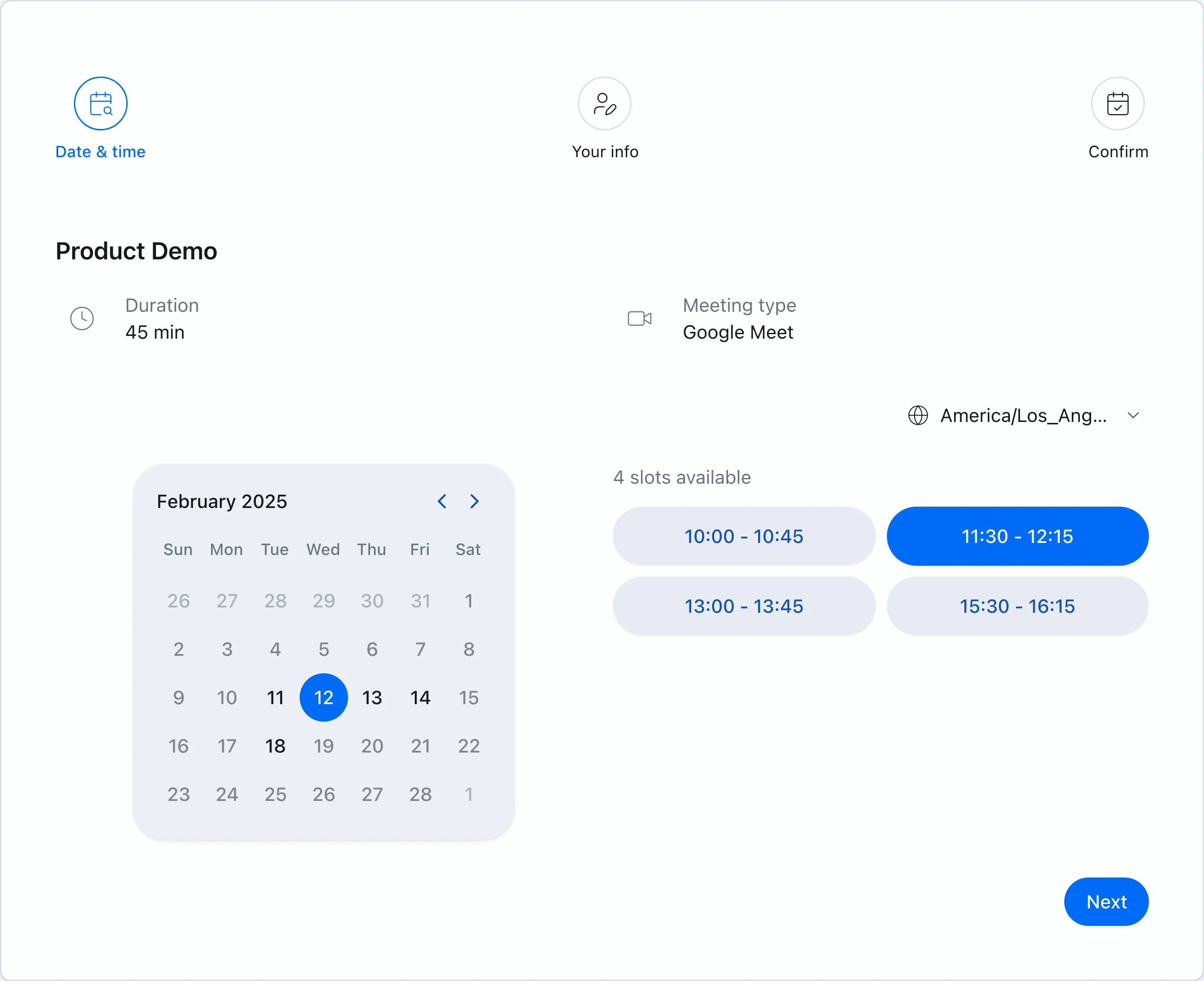 Chronock booking pages show only genuinely available times based on your connected calendars.
Calendar-to-calendar sync against double bookings
Chronock lets you create sync rules between calendars — Google-to-Google, Outlook-to-Outlook, and cross-provider Google-to-Outlook. The Free plan includes one one-way, busy-only rule; Pro adds multiple rules, two-way sync, and the option to show titles or descriptions at the destination. Personal events block your work calendar without exposing private details — a job that otherwise requires a second, separate tool next to Cal.com.
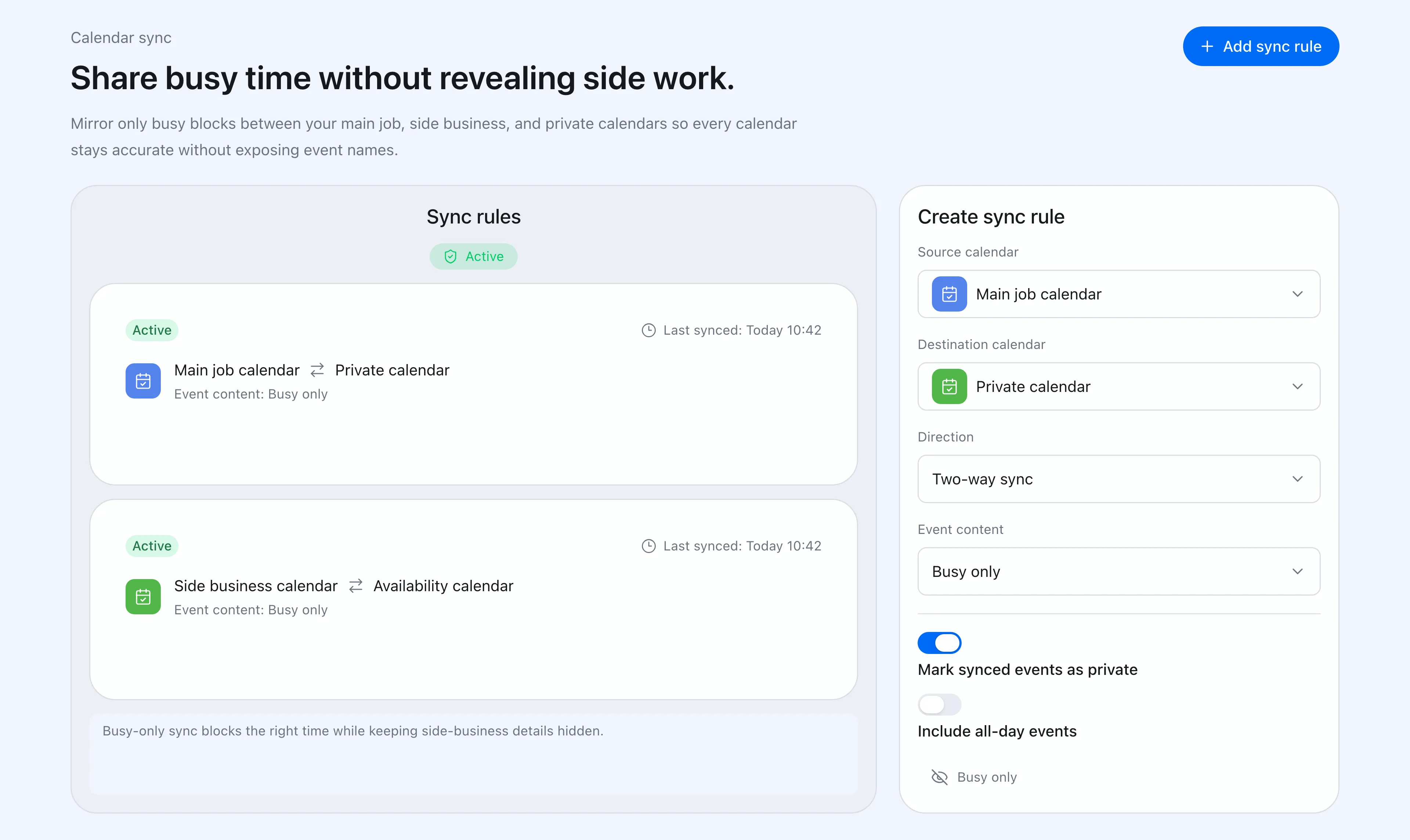 Sync rules control direction and how much event detail reaches the destination calendar.
Candidate times as text, with holds
Chronock’s candidate dates tool turns real availability into copy-friendly text for email or chat, and Pro’s provisional holds protect proposed times while you wait for a reply.
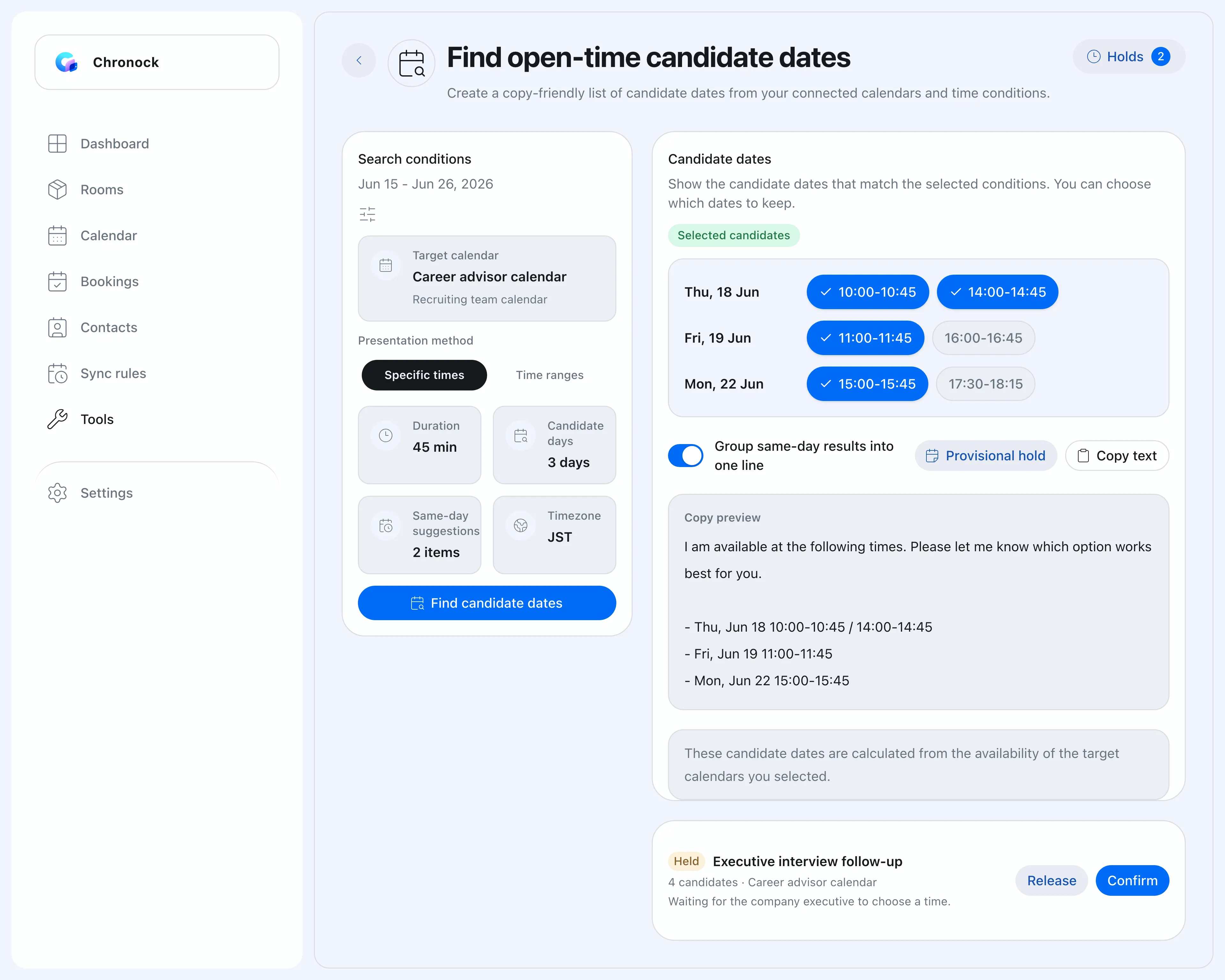 When texting candidate times fits better than a link, you have both options.
Booking history and contacts built in
Chronock Pro includes booking history, contacts, and notes without wiring up Salesforce or HubSpot — a fit for freelancers and small teams who want light CRM context, not a CRM project.
A deliberately small product
Chronock covers booking pages, availability, candidate times, sync, and history — and stops there. If that scope matches your needs, the day-to-day product is simpler to set up, explain, and run.
What to watch with Chronock
Chronock supports Google Calendar and Microsoft Outlook calendars (Microsoft 365 work or school accounts); Apple Calendar and CalDAV are not supported. Chronock’s Outlook integration works with Microsoft 365 work or school accounts. Personal Microsoft accounts (such as Outlook.com) are not supported due to Microsoft API limitations. Cal.com’s provider coverage is still broader.
Chronock’s Free plan includes one booking slot versus Cal.com’s unlimited free event types, there is no native mobile app, no payments at booking, no routing forms, and no public scheduling API comparable to Cal.com’s developer platform.
Before choosing Chronock, check:
- Whether Google and Microsoft 365 Outlook coverage is enough.
- Whether unlimited free event types matter more than sync and CRM.
- Whether you need a mobile app, payments, or routing forms.
- Whether a smaller product scope is a benefit or a constraint for you.
Which should you choose?
| Situation | Easier choice |
|---|---|
| Unlimited free event types across many providers | Cal.com |
| Apple Calendar or CalDAV support | Cal.com |
| Round-robin, routing forms, managed events | Cal.com Teams |
| SSO, SCIM, SOC 2, HIPAA requirements | Cal.com Organizations |
| Scheduling APIs and embeds in your product | Cal.com |
| Calendar-to-calendar sync against double bookings | Chronock (one rule on Free, more on Pro) |
| Candidate times as text with provisional holds | Chronock Pro |
| Built-in booking history and contacts | Chronock Pro |
| A small, simple tool scoped to Google and Outlook calendars | Chronock |
Bottom line
Cal.com is a scheduling platform in the fullest sense: an outstanding free plan for individuals, deep team and enterprise features, developer APIs, and broad calendar support. If you want maximum capability, it earns its reputation.
Chronock is intentionally narrower: Google and Outlook calendars in, one workflow out — booking pages, candidate times, event sync, and post-booking history working together at a low price.
If scheduling capability is the goal, pick Cal.com. If keeping several calendars — Google, Outlook, or both — coordinated, with scheduling as part of that job, is the goal, pick Chronock.